
Integrated Computer-Assisted Translation Tool (CATT)
Before detailing the interface for translators and proofreaders, it is important to highlight the seamless integration of the Computer-Assisted Translation Tool (CATT) within the overall system. This integrated approach provides significantly greater advantages and convenience than using a standalone application. By embedding the CATT directly into the translation management workflow, users gain immediate, unified access to all translation resources without having to switch between disparate tools.
The seamless integration ensures a continuous workflow and full system interoperability: translation tasks flow uninterrupted through the platform, and data is synchronised automatically across components. In contrast to siloed setups, the unified solution avoids duplicate work and manual data transfers – if CATT and management systems are used separately, the same tasks often end up being repeated, leading to inefficiencies. An integrated CATT therefore markedly improves operational performance and user experience by streamlining processes and automating repetitive tasks. Translators can work more efficiently and maintain consistent terminology and style across all projects, since the system reuses existing translations and enforces uniform standards. In essence, the unified CATT system creates a comprehensive translation ecosystem that optimises efficiency, consistency, and quality, providing a strong foundation upon which the translator and proofreader interface can further enhance productivity and continuity.
At the core of this integrated setup is SDL Trados GroupShare, a high-performance enterprise translation memory system developed by RWS Group. GroupShare has been fully embedded into TTN’s CATT container since 2012, where it operates as the primary translation engine. It enables centralised, server-based translation management and offers full CATT functionality via both Trados Studio and a built-in online editor. This allows translators, reviewers, and project managers to collaborate in real time using either desktop or browser-based tools, all connected to the same translation memory and terminology repositories.
GroupShare also delivers superior performance in fuzzy match retrieval and concordance searches when compared to other TM solutions, particularly in high-volume environments. Its integrated MultiTerm database supports advanced morphological search, lemmatisation, and compound decomposition – essential for technical and multilingual domains. Although the native user interface is limited in automation capability, TTN has overcome this by developing the TTN-SDL Server, which manages all advanced communication between GroupShare and the TTN platform. This ensures that GroupShare functions as a seamlessly integrated engine within the AI-powered TTN TMS, enabling scalable, secure, and efficient translation operations that meet the demands of even the most complex institutional environments.
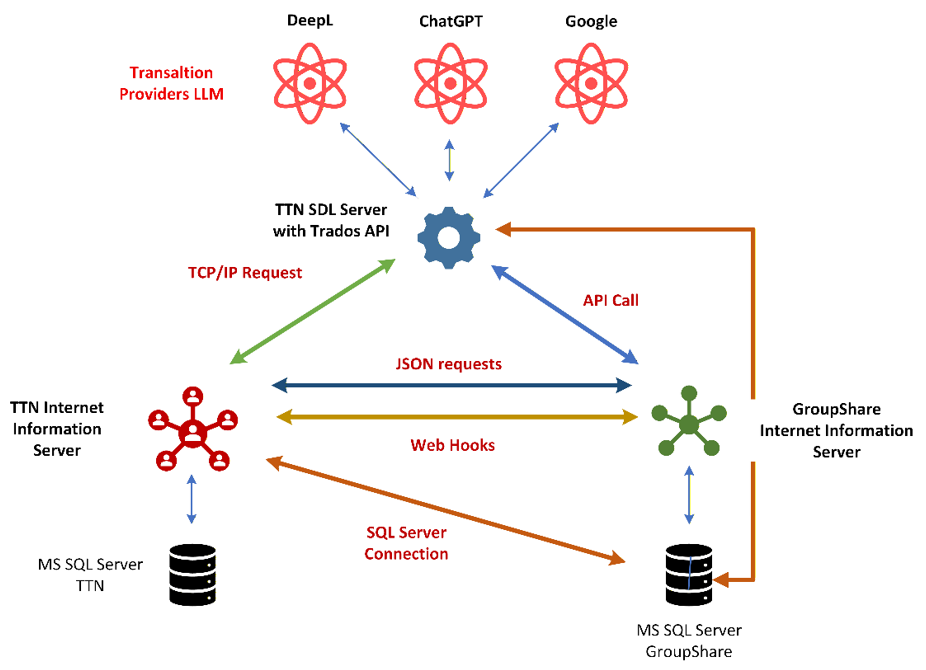
Figure 1: TTN SDL Server ensures communication with GroupShare
TTN TMS utilises a dedicated application called TTN SDL Server to abstract away the complexity of the GroupShare interface. This specialised TCP/IP server acts as an intermediary between TTN’s web portal and the GroupShare platform, automatically handling user requests (e.g., new project creation, translation memory integration, user permission management).
TTN SDL Server abstracts the complexity of GroupShare by automating project setup, translation memory and termbase binding, and permissions, so workflows run faster and more consistently with fewer manual bottlenecks. Users work only through the simple TTN web interface, improving usability while the server handles all background operations transparently. The architecture scales to high volumes, integrates cleanly with the wider TTN TMS and existing systems, and increases reliability by reducing errors and repetitive tasks.
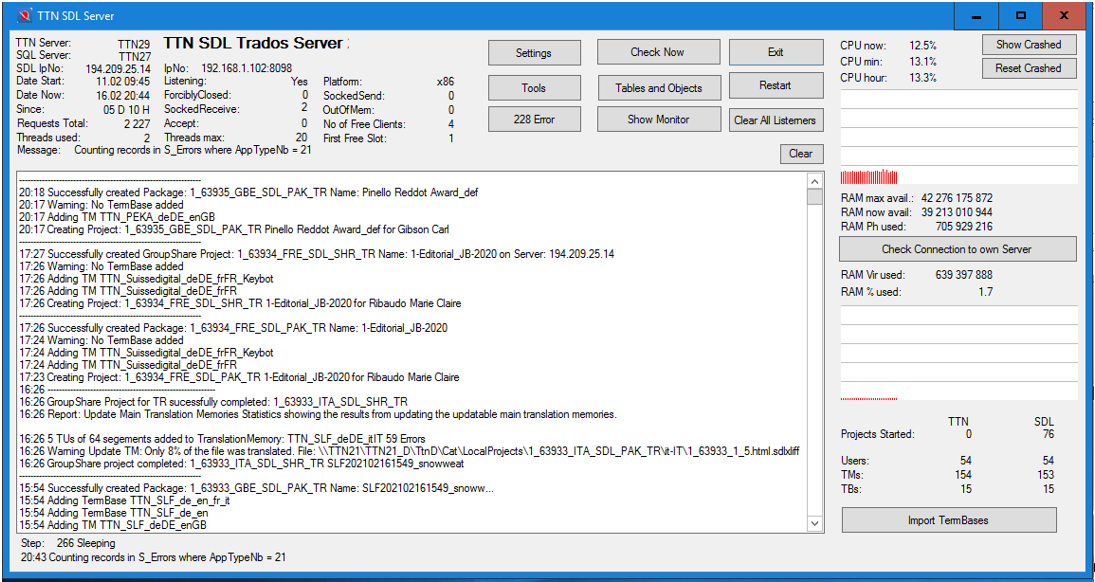
Figure 2: TTN SDL Server publishes projects on the GroupShare server
TTN-SDL creates Trados projects and publishes them on the GroupShare server, embedding the necessary Translation Memory and Termbases.
As soon as the link is ready, the system sends an email to the translator and publishes the link online to be opened with the GroupShare online editor. The translator or proofreader can also open the project in Trados Studio and may also receive Trados packages or bilingual review files.
The TCP/IP server developed by TTN automates the task, assigns the required access rights, creates new Translation Memories when a language pair is not yet available, and adds new languages to the TermBases as needed. It ensures appropriate access rights for translators and proofreaders and revokes them once the job is completed.
Automatic translation in Trados using providers such as DeepL, ChatGPT, or Gemini is usually carried out through plugins, which come with several disadvantages. The translator or proofreader must purchase an API code and a subscription. Furthermore, these plugins cannot enter a conversational mode with the language providers, and in most cases they only take full matches into account during pre-population. For a translator, however, an 80% or 90% match is often more valuable than a raw machine translation. This is why TTN-SDL pre-translates the XLIFF files directly without relying on plugins.
Import and Export Tools
TTN-SDL is the centrepiece of the system. It answers terminology and Translation Memory requests, and exports and imports Termbases and translation memories.
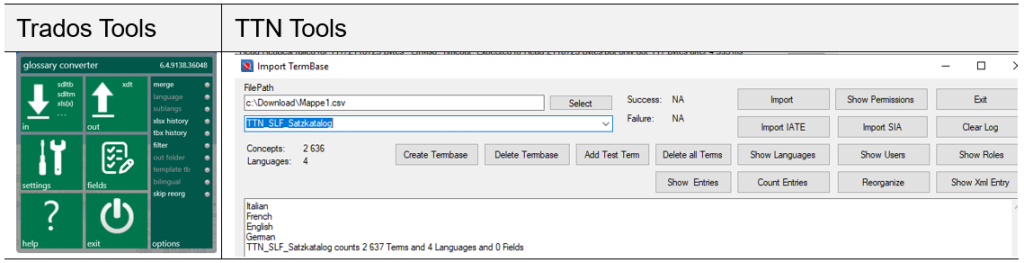
Figure 3: Custom TTN termbase and TM import tools vs. Trados tools
The official Trados tools are limited in functionality and format compatibility, and it is impossible to import most formats. The TTN Application includes a wide palette of tools to import and export a wide variety of formats.
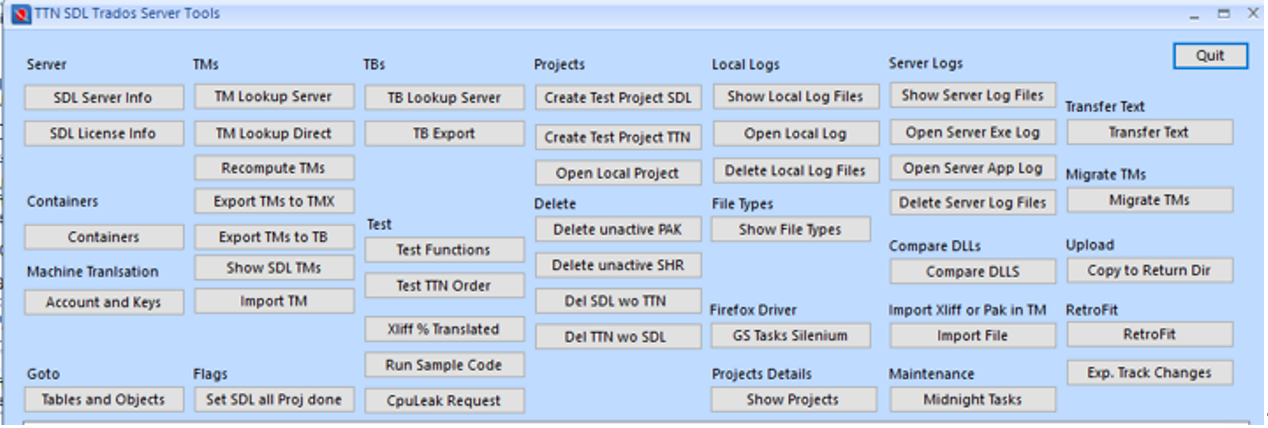
Figure 4: The server is continuously adapted to new MT providers
It includes a large range of test tools that allow system developers to quickly adapt the program to the newest innovations.
Retrofit Tool
One of these tools is the Retrofit tool. Many translations from universities and other institutions include scientific or political papers written by bilingual specialists. Similarly, many Swiss federal offices have internal language departments that review outsourced translations once they are submitted. These specialists revise the translated papers and add valuable improvements and terminological precision, especially for scientific literature. Unfortunately, they often do not use CATT tools, and their corrections are made only in Word—frequently without proper track changes—and are sent back as feedback to the translation headquarters. This is where RetroFit becomes essential. Since the retrofit process in Trados cannot be automated, the automatic Retrofit tool of the TTN TMS takes over.
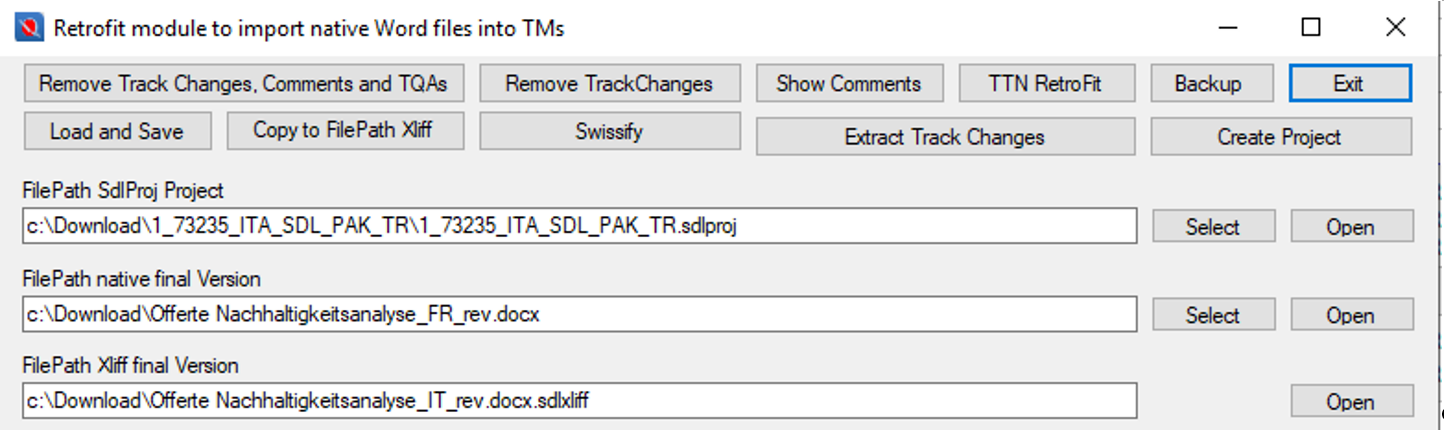
Figure 5: Retrofit tools to import native Word files into TMs
The client can upload revised translations. The feedback files are compared with the delivered translation, and the changes are automatically integrated into the XLIFF files. The Translation Memory is updated without any human intervention. These tasks run in the background, but a developer interface is available to debug potential issues.