
Overview
The Translation Control Interface (TCI) is used by translation managers to monitor and manage translation projects.
The system allows the addition of an unlimited number of translation managers.
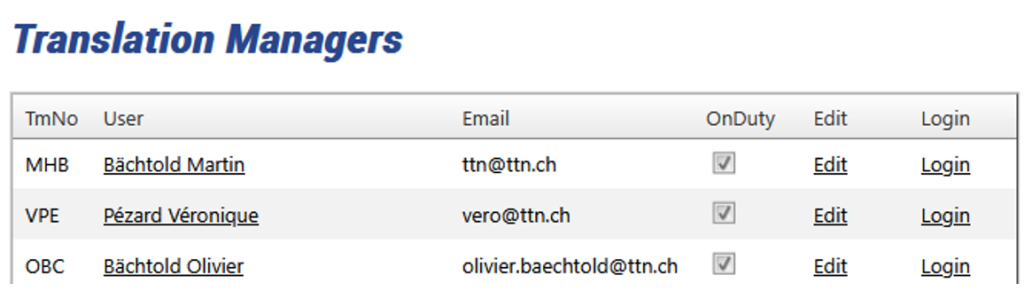
Figure 1: Translation Managers
Translation Managers can be assigned to individual clients, client groups, or specific orders. When a Translation Manager is on duty, they receive an alert as soon as a new order arrives, an order is delayed, not confirmed, or not completed. Any issue automatically triggers a notification via WhatsApp, SMS, or email.
Translation Managers can—once sufficiently experienced—access more than 500 forms, 98% of which are designed for special cases. In day-to-day operations, they only need to be familiar with around ten forms. Initial training time is very short; however, over the years, they can progress to more advanced levels. These higher levels are required to manage highly complex projects, specialized TMs, and termbases. Within the scope of this presentation, only a limited selection of screens is shown.
The Translation Manager has access to a dashboard that displays either all current translation orders or only the orders assigned to that specific manager.
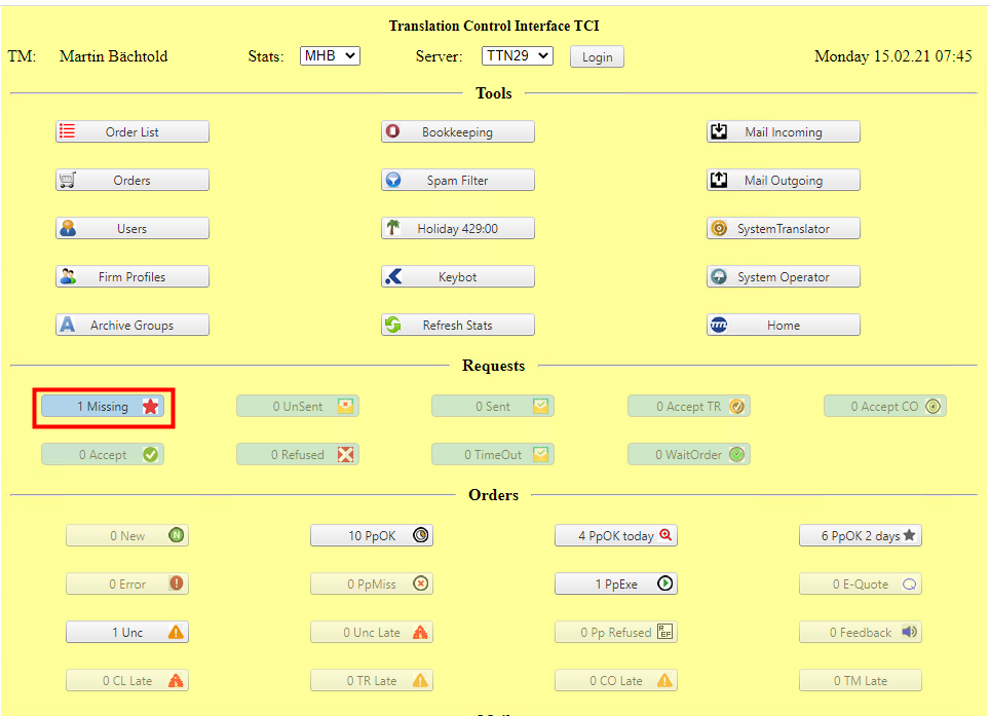
Figure 2: Translation Managers main dashboard
The Translation Manager dashboard displays only the most essential information about active translation projects, ensuring a clear and focused overview of ongoing activities. In the example above, a single request is highlighted because no translator has been assigned, immediately drawing the manager’s attention to a critical issue.
Most dashboard panels appear only when an issue requires attention, ensuring that the Translation Manager is not burdened with superfluous or irrelevant information. The system automatically refreshes all displayed data every minute, providing real-time updates for timely monitoring and intervention.
The system displays incoming emails, overdue orders and order confirmations, as well as unread messages, while enabling comprehensive control and monitoring of the entire workflow.
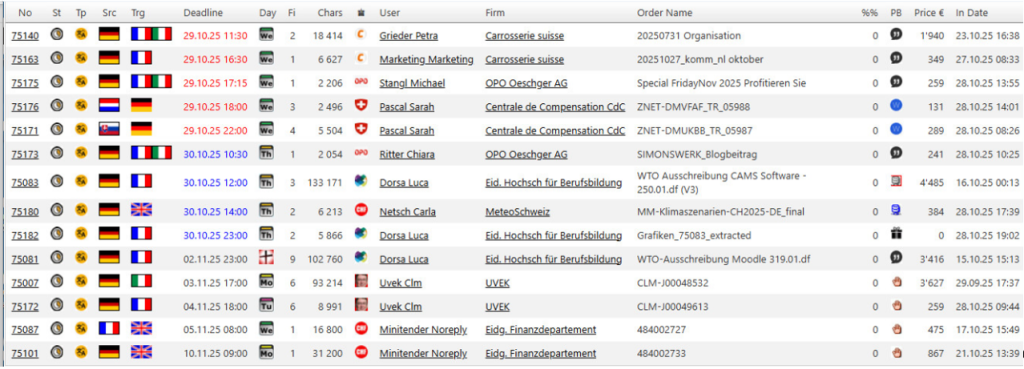
Figure 3: Order list with clearly recognisable icons
There are several order lists for unconfirmed, overdue, and current orders. The red orders are due today, the blue orders tomorrow.
Individual orders can be accessed through the main order panel, which shows all order-relevant information. TTN TMS workflow is state-driven. The state of each order is shown on the main panel, and as soon as translators and proofreaders have confirmed or executed all files of a given order, the state is changed automatically.
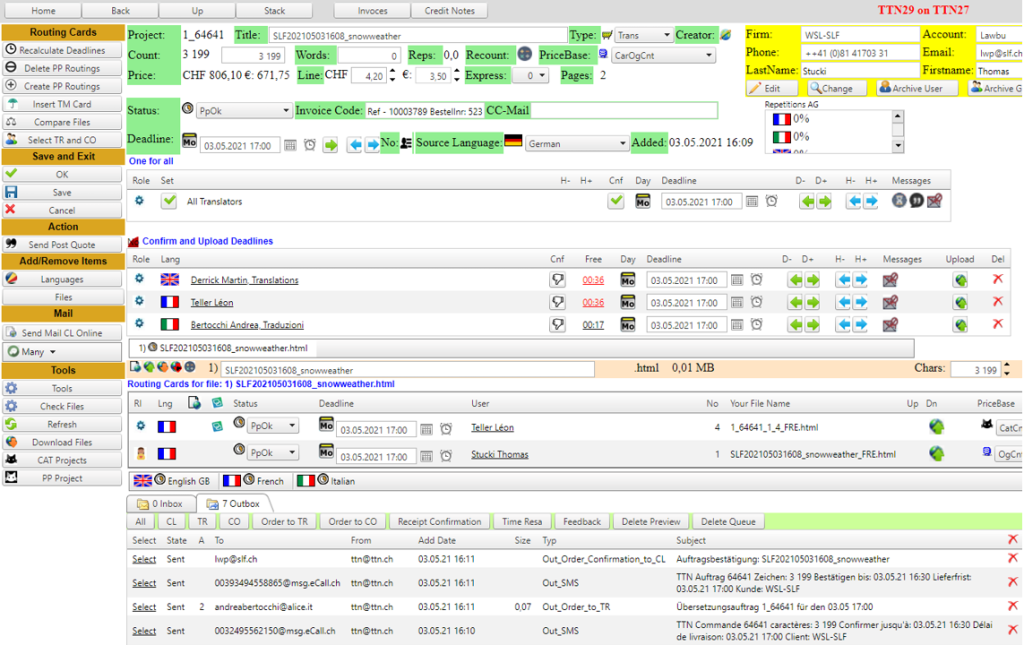
Figure 4: Order overview
An order can contain an unlimited number of files and target languages, but it always has a single source language. If an assignment involves two or more source languages, the system automatically splits it into several sub-orders.
The order overview displays the client information, deadline, volume, assigned translators and proofreaders, confirmation deadlines, and other relevant details. It provides a wide range of tools and numerous predefined emails. With a single click, the Translation Manager can send a message to all users involved in the project, or specifically to translators or proofreaders. The system is linked to Outlook and supports communication via email, SMS, or WhatsApp in various configurations.
Deadlines are calculated automatically and optimized to ensure the most efficient execution of the translation. The deadline calculation algorithm takes working hours and current workload into account.
The system also collects all order-relevant incoming and outgoing messages, comments, notes, instructions, QA reports, and AI analyses. It manages special types of information, documentation files, previous versions of the translation, and much more.
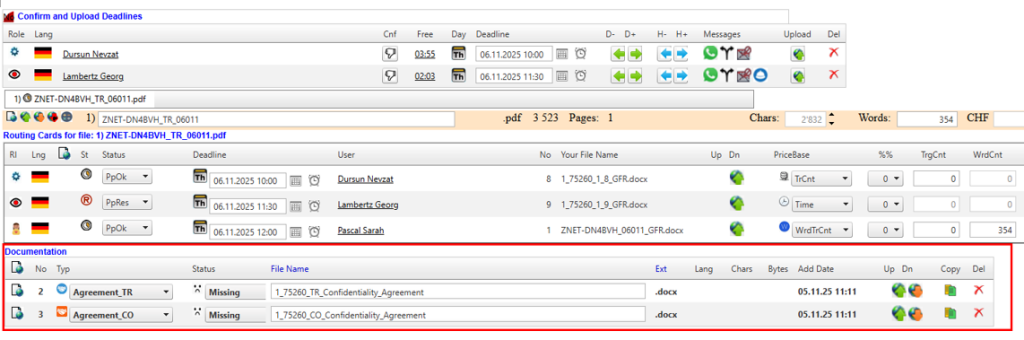
Figure 5: Confidentiality agreements
The system generates confidentiality agreements and lists AI-translated files, performs PDF-to-Word conversions, identifies files requiring updates, and provides both client and Translation Manager instructions, along with various other specialised information items attached to each order. The Translation Manager can open XLIFF files directly in the online editor, view them as HTML files, or access them in their native format, ensuring maximum flexibility and control during project management.
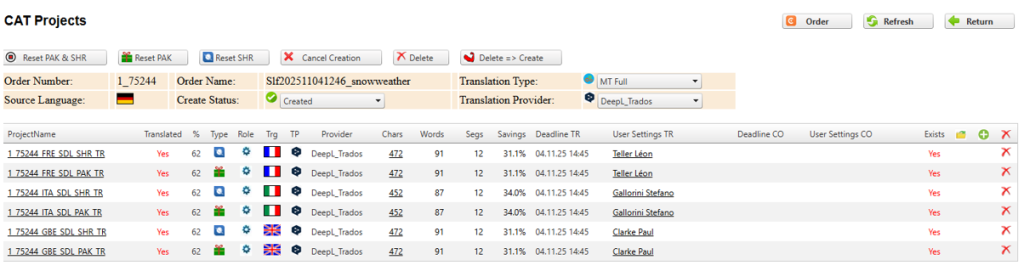
Figure 44: List of CAT projects
The CAT projects are generated automatically, and the translation manager can supervise and access each project individually.
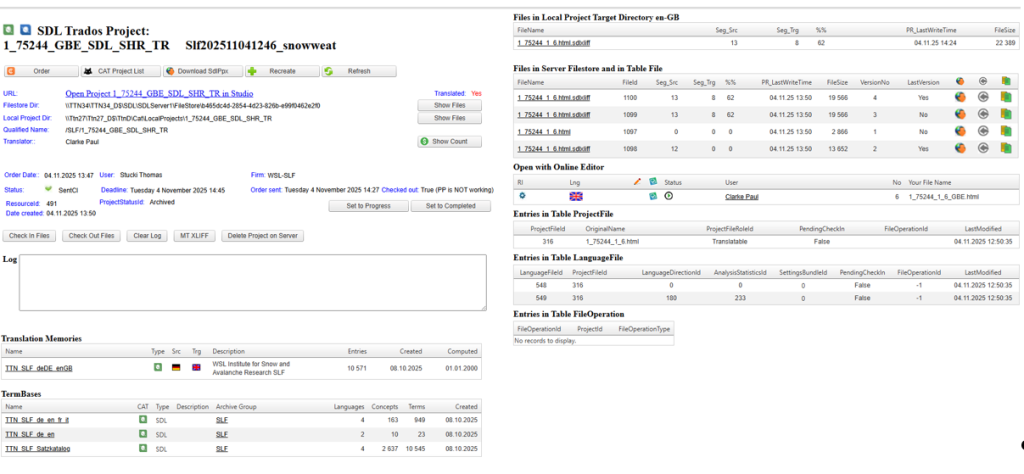
Figure 6: CAT projects on the GroupShare server
TTN TMS can directly access the resources of each project by reading data from the Trados GroupShare filestore and database. In practice, this means that all versions of project files are tracked, listed, and immediately accessible for viewing or download whenever needed. This integration with GroupShare ensures full visibility of every file version and project asset, providing a comprehensive and up-to-date overview of all project resources.
The tools for accessing file versions and project data are generally not needed in everyday business operations. They are primarily intended for diagnostic purposes and error tracking. In case any issues arise during a project, these tools allow project managers and support teams to trace all steps and changes, offering full transparency of the workflow. Every process can be followed and audited, which is invaluable for troubleshooting and ensuring that the translation workflow remains clear and accountable.
The TTN TMS module follows a non-deletion policy for project files. Instead of permanently deleting files, TTN TMS simply marks files as “deleted” in the system. This means that no file is ever truly lost – a file marked as deleted can be recovered at any time by the translation manager. This soft-delete approach safeguards against accidental data loss and allows easy recovery of files whenever necessary, ensuring that valuable translation work and file history remain intact for future reference or rollback.
One of the most important tasks of the Translation Manager is order assignment to Translators and proofreaders. There are two systems.
Manual Selection of a Dedicated Translation Team
TTN TMS uses client or client group profiles to assign translators and proofreaders to an order or a client account.
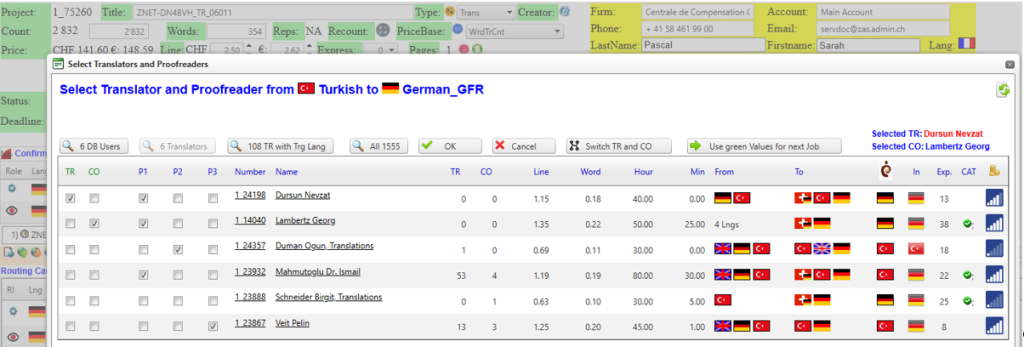
Figure 7: Manual order assignment
When a new client or a member of a client group requests translations for a specific language pair, the Translation Manager assigns a dedicated translator and proofreader team to that client. This usually involves selecting a primary translator and a primary proofreader who will handle the client’s projects in that language combination. The rationale is to maintain consistency and quality: when the same small team of linguists works on all content for a client, they become deeply familiar with the client’s preferred terminology and style, resulting in more uniform translations. Team members can also be given different priority levels – for example, one translator is marked as first priority (primary), and another as second priority (backup) – to ensure there is always a qualified person available for the work.
Once the translator–proofreader team has been established for the client, the system will consistently propose the same primary translator for all subsequent jobs from that client. This practice helps preserve a consistent tone and terminology across all the client’s projects, as the translator builds up specific knowledge of the client’s content and preferences. However, real-world constraints like workload and availability are taken into account through the priority system. If the primary translator is overloaded with work or explicitly refuses a new job, the system will automatically select the next available translator – i.e. the translator with the second-highest priority for that client’s language pair – to take on the project. In other words, the backup translator steps in if the first-choice translator is unavailable. This automatic fallback mechanism ensures that projects can continue without delay even when the preferred linguist can’t take on a task.
The proofreader selection works in tandem with the translator assignment. Typically, the assigned proofreader remains the same for consistency, and a similar priority ranking can be used for proofreaders. This way, if the primary proofreader is unavailable, a secondary proofreader can be engaged to review the translations. By maintaining a stable translator–proofreader team with defined backups, the Translation Manager ensures both continuity and reliability in the workflow.
Autopilot Mode and Automatic Assignment
If the Autopilot feature is activated for the project, the system will handle the assignment process automatically, without the Translation Manager’s intervention. Autopilot mode in a translation management system means that the software itself selects the appropriate translator and proofreader based on the predefined team and their priority, and then forwards the project to them hands-free. In practice, the platform will evaluate the language pair requested and automatically assign the job to the highest-priority available translator and proofreader for that client. It will typically send out notifications or job invitations to those linguists instantly. All of this happens without any manual steps – the Translation Manager does not need to contact translators or push any buttons once Autopilot is running. The project files and details are routed to the selected translator and proofreader automatically, and the work can begin right away.
Behind the scenes, Autopilot uses the rules set up by the manager. For example, if the primary translator is at capacity or unavailable, the system will immediately move to the secondary option on its own. The entire workflow can be executed without human intervention, apart from the linguists doing the translation and proofreading work. The Translation Manager only needs to oversee the process at a high level, rather than assigning each task.
Notably, if Autopilot is on and a translator doesn’t accept or respond to an assignment, the system can automatically proceed to the next available linguist. For instance, the automation will invite the top-choice linguist first, and if they decline or time out, it will then invite the next set of linguists in line until someone accepts. This ensures that even with Autopilot, the backup priorities are respected and the project isn’t stuck waiting on one person. Finally, once the translator and subsequently the proofreader complete their tasks, the system can even forward the completed translation back to the client or mark the project as done with minimal manager involvement, depending on how the workflow is configured.
Benefits of Using Priority Teams and Autopilot
Implementing a priority-based team assignment together with an Autopilot workflow offers several benefits:
- Consistency in Quality: Keeping the same translator for a client’s projects leads to more consistent translations, as the translator is familiar with the client’s terminology and style guide. The proofreader likewise ensures the same quality standards are applied across jobs. This consistency strengthens the client’s trust in the translation service.
- Efficiency and Speed: The system’s automatic fallback to a second-priority translator when the first is unavailable means projects don’t get held up waiting for one specific person. Work can commence with the backup without managerial delay. Autopilot further accelerates the process by removing the need for manual assignment – jobs are created and dispatched to linguists immediately when a request comes in. This immediacy can shorten turnaround times significantly.
- Reduced Managerial Workload: With Autopilot handling routine assignments, the Translation Manager can focus on oversight and exception handling rather than every single task assignment. The mundane steps (creating jobs, selecting translators, sending files) are automated, which cuts down on administrative overhead. Fewer manual hand-offs also reduce the chance of human error in assigning the wrong person or missing a request.
- Reliability and Scalability: A priority system with designated backups makes the translation process more resilient. Even if the volume of work increases or if multiple translators are at capacity, the system can scale by tapping into the next available qualified linguists in the priority list. This is especially useful for large projects or when managing many clients – the combination of a structured team lineup and automation allows the operation to handle growth without sacrificing response time or quality. In essence, the workflow is “always on” – new translation jobs trigger the system to find the right team members and start the work, maintaining throughput even at high volumes.
In summary, the Translation Manager’s ability to assign a translator/proofreader team with set priorities ensures each client gets a dedicated team for consistency, with backups ready to maintain continuity. And when Autopilot is enabled, the entire assignment and delivery pipeline runs automatically – selecting translators, inviting them to the job, and forwarding projects – all without the manager’s direct input, unless intervention is needed. This blend of human expertise (through dedicated teams) and automation (through Autopilot) leads to a more efficient, reliable, and scalable translation service workflow.
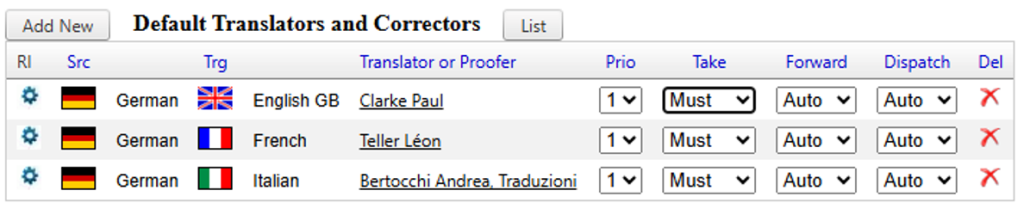
Figure 8: Parameters for autopiloted workflow
Some clients prefer to have the same translators and proofreaders handle all their projects to ensure continuity. In the example profile, the client has chosen to work exclusively with a fixed team for all translations. This approach means the designated linguists become deeply familiar with the client’s terminology, style, and preferences over time, leading to improved consistency and quality in the translations. By consistently pairing the client with the same translator (and reviewer), the workflow builds a strong understanding of the client’s content, rather than assigning projects arbitrarily to any available linguist.
To enforce the use of the same team, the system’s assignment setting called “Take” is configured to “Must.” This Must setting indicates that the primary chosen translator is required to take each incoming job for that client’s projects. If the preferred translator is unavailable or declines the task, the automated workflow will halt instead of automatically moving on to another translator. In other words, the translation request will not be reassigned to a different person without intervention – it stops and flags the Translation Manager, rather than violating the client’s preference for that specific translator. This strict parameter ensures the client’s exclusivity request is honored, albeit at the risk of delays if the particular translator cannot accept a job.
Automated Workflow Sequence
With the profile configured this way, the translation management system runs on autopilot for the entire process. The key steps in this autopiloted workflow are:
- Automatic Assignment to Translator: Whenever a new translation order comes in from the client, the system automatically forwards it to the pre-selected translator designated for that client. (Because the ‘Take’ option is Must, if this translator is not available to take the job, the process does not auto-assign to anyone else – it will pause for manual handling.)
- Handover to proofreader: Once the translator accepts and completes the translation, the system immediately routes the job to the assigned proofreader for review without any manual step needed. The proofreader is predetermined as part of the client’s fixed team, ensuring the review is also handled by the familiar linguist.
- Automatic Delivery to Client: After the proofreader finishes the review and approves the work, the final translated document is delivered directly to the client. The system sends the completed translation back through the client portal or via email automatically, with no intervention by the Translation Manager required in this entire cycle.
This autopiloted workflow configuration streamlines the project flow while maintaining a consistent team for the client. All tasks – assignment, progression to next step, and delivery – occur seamlessly in the background. The Translation Manager does not need to manually oversee each stage, provided the designated linguists are available and accept the tasks. By leveraging the same trusted translator-proofreader duo for every project, the client gains in consistency and the team’s productivity often improves as they become increasingly knowledgeable about the client’s content and expectations. The trade-off of the strict Must setting is that if the chosen translator cannot take a job at a given time, the job will wait for attention rather than being reassigned automatically, thus preserving quality and familiarity at the potential cost of speed.
Automatic Order Assignment by Time-Delayed Requests
Some clients require translations in a very large number of language combinations—sometimes up to 200, including many rare or less common pairs. In such cases, it is unrealistic for the Translation Manager to know the strengths, specializations, and availability of every translator. To address this, the system uses an AI-driven assignment mechanism for translators and proofreaders. All qualified linguists for each language pair are grouped into a dedicated pool, which the AI consults to assign new orders to the most suitable and available translator.
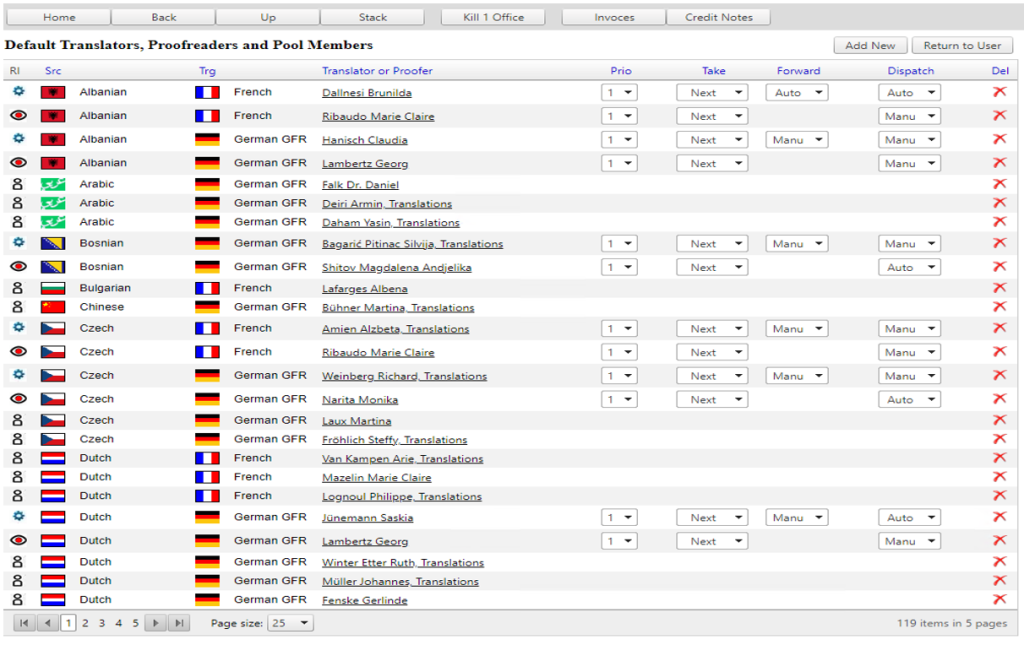
Figure 9: Translator and proofreader pool for each language combination
For example, the Central Compensation Office (CCO) in Geneva has, in recent years, requested translations in more than 150 language combinations. To manage this volume and diversity, the system maintains a pool of over 500 specialized medical translators. When a new order arrives from such a client, the system automatically broadcasts a translation request to the relevant pool via multiple channels—WhatsApp, SMS, email, and the mobile platform. The highest-ranked and most suitable translator or proofreader, as determined by the AI algorithm, receives the request immediately, ensuring that the best-qualified expert has the first opportunity to accept the job.
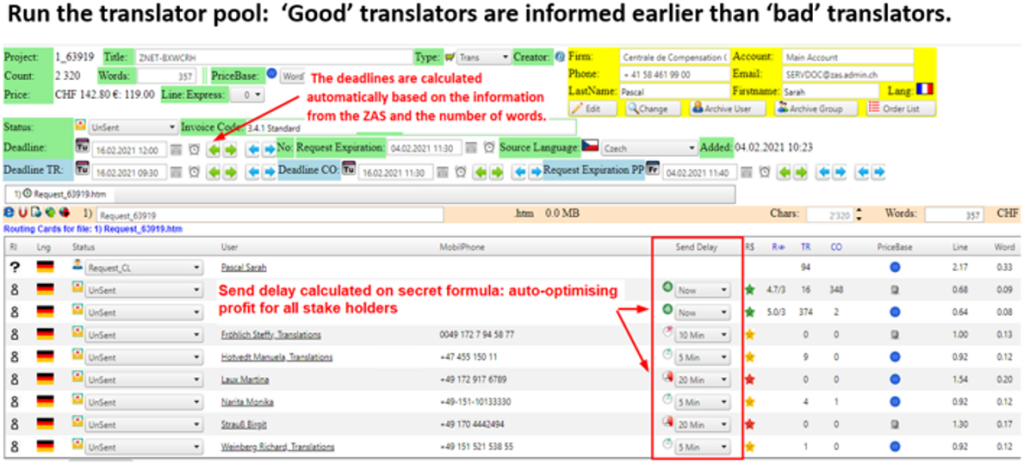
Figure 10: The most suitable translator gets the request immediately
The translator can accept the assignment directly through a convenient interface (for instance, by selecting an option in the WhatsApp menu or by replying to the SMS). If none of the first group of top-ranked translators accepts the request within five minutes, the system automatically escalates the request to the next set of qualified translators. This process is repeated in five-minute intervals, expanding to a broader pool each time until a translator accepts the job. This time-staged broadcasting strategy balances speed and quality: it gives the best translators a brief exclusive window to respond, thereby maximizing the chances of a high-quality translator taking the job, while still ensuring that the request is filled quickly by the wider pool if the top choices are unavailable.
Each translator in the pool is ranked by an AI algorithm that continuously learns and updates rankings based on up to ten performance metrics. These metrics include factors such as the feedback scores from proofreaders on previous projects, the number of jobs the translator has successfully completed, punctuality (e.g. instances of late deliveries), the translation manager’s qualitative appraisal, the frequency and extent of revisions required by the proofreader, the time efficiency recorded by the proofreader during revisions, and other relevant performance indicators. By holistically evaluating these criteria, the AI is able to identify the most suitable translator for each new order, matching subject-matter expertise and reliability to the job’s requirements.
Benefits of the AI-driven, time-delayed assignment approach
This automated assignment system has proven to be far more effective than manual assignment. Key advantages include:
- Improved Translation Quality: By always selecting the highest-rated available translator for the task, the system enhances overall quality. Each completed order provides more data to the AI, further refining the rankings. Over time, translation quality improves with each new order as the system becomes increasingly adept at matching jobs to the translators who handle them best.
- Efficiency and Speed: The moment an order is submitted, the top-ranked translator is notified instantly. In most cases, a suitable translator accepts the job within minutes, without the delays of manual coordination. Even when the first-choice translators are unavailable, the iterative 5-minute request cycle ensures that another qualified linguist is found swiftly. This minimizes idle time and accelerates project start times, all while preserving a high standard of quality.
- Optimal Resource Utilization: The AI continuously monitors translator performance. If a particular translator’s work starts to require unusually extensive proofreading or consistently falls short (for example, if their translations often need significant revisions or take a long time to review), their ranking will drop accordingly. This opens opportunities for other translators in the pool to step in and demonstrate superior performance. In this way, the system encourages healthy competition and continuous improvement among translators. High-performing translators are rewarded with more opportunities, whereas lower-performing ones receive fewer assignments until they improve, ensuring that clients get the best service possible.
- Scalability and Manageability: For translation managers, the AI-driven system greatly simplifies handling large and complex projects. Managing requests in 150+ language combinations with a pool of hundreds of translators would be overwhelming to do manually. The AI selection mechanism can scale to these demands effortlessly, tracking each translator’s skills and history in ways a human manager cannot easily do. This results in better matches between translators and assignments (especially for specialized domains like medical translation in the CCO example) and significantly reduces the administrative burden.
In summary, the time-delayed AI assignment process ensures that each translation order is handled by the most qualified and reliable translator available, while maintaining quick turnaround times. It combines the intelligence of data-driven ranking with a sensible staged notification system. This approach not only improves translation quality and consistency but also increases efficiency in project workflow. The system’s performance in practice has demonstrated markedly better outcomes than manual assignment, validating the use of AI for translator selection in large-scale and multi-language translation projects.
AI-Driven Mail Robot
In a modern translation management environment, an AI-driven “mail robot” acts as an intelligent email processing agent. It automates the handling of incoming translation requests via email, from recognizing standardized order formats to distributing tasks, with minimal manual intervention. By integrating natural language processing (NLP) and machine learning, this system ensures that every email – even those from outside digital platforms – is processed consistently, quickly, and transparently within the translation workflow.
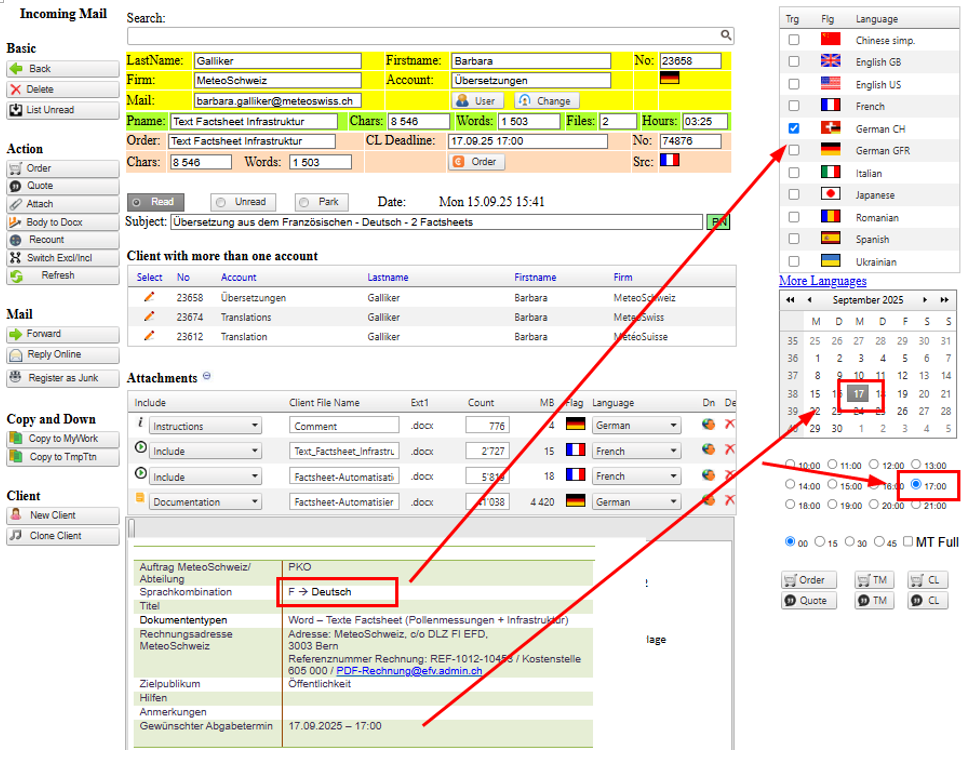
Figure 11: Mail robot interprets the mail contents
One of the mail robot’s core functions is recognizing a wide range of standardized email formats used by clients to request translations. The system leverages structured email parsing techniques to identify key information in these emails based on predefined patterns or templates. For example, if a client uses a fixed email template for orders (with fields like source language, target language, deadline, word count, etc.), the AI will detect those fields automatically. Once an email order is detected, the content is automatically converted into a structured TTN TMS order record. This means the email’s unstructured text is transformed into a formal job entry without any manual data entry. In essence, the mail robot acts like an email parser that extracts crucial details (project name, languages, requested delivery date, attachments, etc.) from the incoming message.
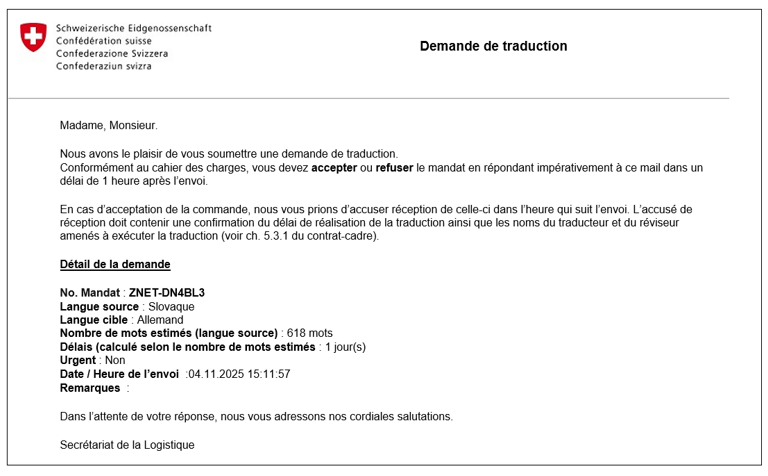
Figure 12: Standardised mail orders are automatically converted in system order
By converting email requests into the structured workflow, the AI-driven mail robot fully integrates non-digital workflows into the automated translation process. In the past, if a client sent a translation request via plain email (outside of a portal or management system), project managers would have to manually create an order in the system. Now, the mail robot bridges that gap automatically. Even if a request comes in as a free-form email, the system can interpret it and bring it into the digital fold. This maintains consistency across all incoming orders – every job, whether submitted through a web portal or email, follows the same standardized process. It also improves speed, as the time from client email to having a job created and assigned is drastically reduced. Moreover, it enhances traceability, since every email order is logged and tracked in the system. There is a clear audit trail from the original email content to the created order and all subsequent actions.
Beyond processing orders, the mail robot also intelligently responds to certain emails automatically using its NLP capabilities. It can understand the content and intent of incoming messages to determine if an automated reply is appropriate.
The AI-driven mail robot not only creates new orders from incoming emails, but it also excels at associating emails with existing projects when applicable. Often, clients or translators will send follow-up emails that reference an order number or project code in the subject or body. The mail robot scans incoming messages for any known order identifiers and, if found, automatically links that email to the corresponding project record in the TTN system.
Given the volume of emails any organisation receives, the mail robot also incorporates a sophisticated spam filter and relevance detector. It uses AI to distinguish between legitimate, relevant emails and unsolicited or irrelevant messages. Traditional email filters might only use rule-based checks or look at sender reputations, but our AI-driven system goes further by analysing the content and context of each incoming email. For example, if an email is a mass marketing newsletter or a random solicitation not related to any translation work, the system will flag or quarantine it so that it doesn’t bother the translation managers.
In summary, the AI-driven mail robot enhances the translation management workflow by automating email-based requests and communications with intelligence and precision. It recognizes and processes standard email orders into the system, replies to routine inquiries, intelligently routes messages to the right people, links correspondence to the correct projects, and filters out noise. All these capabilities work together to maintain a high level of consistency, accelerate turnaround times, and provide end-to-end traceability of translation projects. The translation team can handle higher volumes of work more efficiently, and clients receive swift, accurate service.
Automatic Feedback with Track Change
When the proofreader uploads or checks in the reviewed files, the system automatically compares them with the original files sent by the translator. Using the Track Changes feature, it highlights all modifications made during the review. The system then sends the annotated files back to the translator via email and also publishes them in the translator’s account for reference.
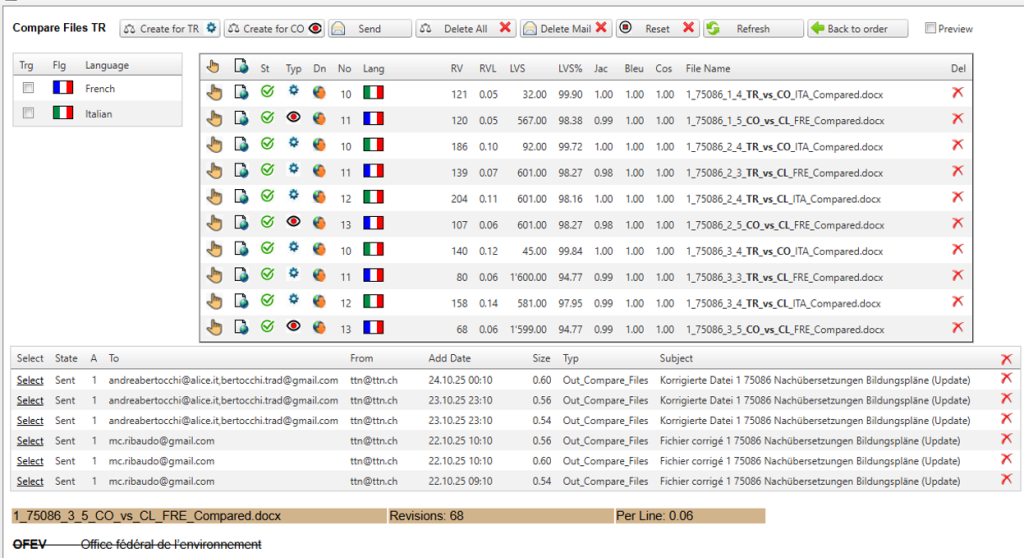
Figure 13: Automatically generated feedback files
The system calculates useful comparison metrics for each reviewed file. These include the number of revisions made, the Levenshtein distance (edit distance between the original and revised text), the BLEU score (an automatic translation quality score), as well as other metrics to quantify the differences. This provides an objective overview of how much the translation was altered during proofreading.
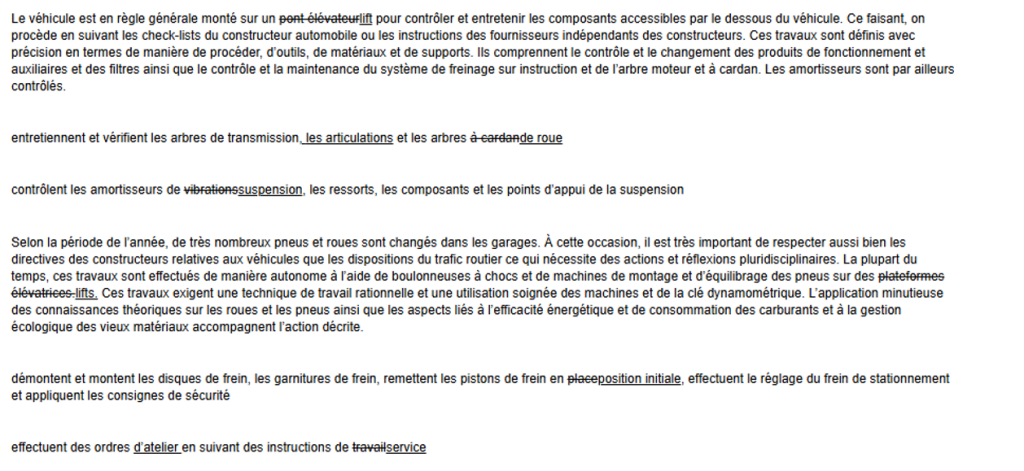
Figure 14: Track change in HTML and Word format
The feedback files with tracked changes can be viewed either as an HTML page or as a generated Word document, making it easy for translators to see exactly what was changed. All confirmed changes are also incorporated into the translation memory (TM) automatically. In this way, the system “learns” from the corrections with minimal manual effort.
Benefits of Automatic Feedback
TTN TMS provides an automatic feedback mechanism that compares reviewed files with the originals, highlights all changes, and feeds accepted corrections back into the translation memory. This capability delivers immediate, data‑driven insight for translators and managers, strengthens consistency across projects, and supports continuous improvement with minimal administrative overhead. The principal benefits are set out below.
- Immediate Visual Feedback for Translators: All modifications are clearly highlighted, allowing translators to easily see and understand the corrections made by proofreaders. This helps translators learn from their mistakes and avoid repeating them in future assignments.
- Quantitative Quality Metrics: By computing statistics like the number of revisions, Levenshtein distance, and BLEU score, the system provides an objective measure of translation quality. Translators and project managers can use these metrics to gauge improvement over time and identify areas that may need additional training or attention.
- Continuous Improvement via TM Integration: Every accepted change is fed back into the Translation Memory. This ensures that future translations benefit from the improvements, increasing consistency and overall quality without extra effort. The organisation essentially becomes a self-improving “learning system,” as the TMS continually updates its knowledge base with each revision.
- Performance Tracking and Quality Assurance: The detailed statistics generated for each translator (e.g., how many changes their work needed) enable the organisation to track translator performance reliably. Management can identify high-quality translators or provide support where needed, using concrete data. This leads to better quality assurance and informed decisions when assigning tasks or evaluating translators.
With this automatic feedback mechanism in place, TTN TMS facilitates a cycle of continuous learning and quality improvement. It provides immediate, data-driven feedback to translators and updates the system’s knowledge base — all with virtually no manual overhead. This not only improves the quality of translations over time but also gives the organisation clear insights into the performance and progress of its translation team.
TTN Counter: Direct Access to Office Applications
Translation Control Interface (TCI) – Browser Use: The Translation Control Interface is accessible through any web browser with no extra installation, making it convenient for Translation Managers to oversee projects from anywhere. However, working purely via browser has a limitation: Office documents (like Word files) cannot be opened and edited in-place. Normally, to make changes, a manager must download the file, edit it, and then upload it back, which is cumbersome and prone to version errors. There is a workaround using a virtual desktop environment, where a more elegant solution is available through a dedicated add-on application called TTN Counter. TTN Counter was initially designed to count words in various file formats. Over the years, it has evolved into a fully-fledged Translation Management Tool.
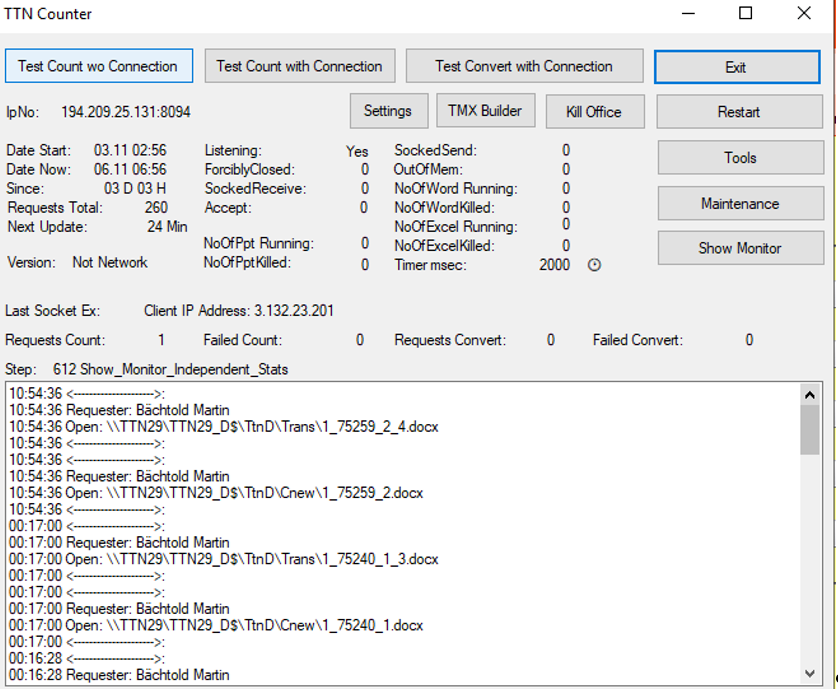
Figure 15: TTN Counter can open Microsoft Office files and many other native file formats
TTN Counter is a lightweight TCP/IP server installed on the user’s machine that communicates with the TCI. When a Translation Manager clicks the “open” icon for a document in the web interface, TTN Counter intercepts the request and launches the appropriate desktop application (Word, Excel, PowerPoint, etc.) with that file. This means the manager can start editing the document immediately in the native Office application without any manual download or upload steps in between. Once editing is done, the changes are saved directly to the file in the system, avoiding the need to separately upload a new version.
Importantly, TTN Counter isn’t limited to Office documents. Because it runs locally with system-level access, it can also open other applications like Outlook and perform over two dozen specialized functions that a web server (like an IIS-based web interface) cannot execute due to security restrictions. In essence, TTN Counter bridges the gap between the online TCI and the user’s desktop environment, enabling a seamless workflow.
Benefits of Immediate File Access with TTN Counter
TTN Counter provides immediate access to Office files for editing, combining the convenience of a browser-based TMS with the power of desktop applications. This direct-access approach not only saves time but also boosts accuracy and productivity for Translation Managers, making the overall translation workflow smoother and more reliable.
- No Manual Download/Upload: All edits can be done directly on the file via the native application, eliminating the time-consuming steps of downloading a document from the browser and uploading it after editing. This streamlines the workflow, especially for frequent changes.
- Reduced Errors: Direct editing through TTN Counter helps prevent mistakes such as uploading the wrong file version or forgetting to upload changes altogether. The file that is opened and edited is the same one linked to the project, ensuring consistency.
- Integration with Desktop Tools: TTN Counter enables the use of full desktop application functionality. For example, a Translation Manager can trigger Outlook or other email functions directly for sending translated files or communications, something not possible through a browser interface alone. In total, TTN Counter supports more than two dozen such desktop-integrated functions, greatly extending the capabilities of the web-based TCI.
- Faster Workflow and Efficiency: By removing browser-imposed barriers, TTN Counter allows Translation Managers to work much faster and more efficiently than with a pure browser setup. There’s no waiting for downloads or risk of duplicating effort. Multiple file edits and management tasks can be handled in a fraction of the time, accelerating project turnaround.