
How can clients use TTN TMS?
TTN TMS is accessed through a secure client portal where accounts can be created self-service or provisioned during a batch migration. Translation requests are submitted in a simple three-step flow (select target language, upload files, choose a deadline). Immediately after upload, the system produces an instant quote and proposes up to seven feasible delivery options, calculated from text volume and real-time linguist availability, with unrealistic deadlines flagged before submission. After confirmation, TTN TMS automatically creates the project, converts files into the required CAT formats, and applies the configured workflow. Where a new language pair is introduced, the platform creates the required translation memory and termbase from templates and binds them to the project, ensuring linguistic assets are built and maintained as part of everyday operations.
Every project is captured in a searchable translation archive. Source and target content is converted to HTML for full-text indexing, enabling fast keyword search across past work, side-by-side viewing of source and target, and quick retrieval of deliverables and related assets such as instructions, XLIFF files, or documentation. Access is controlled through client profiles and archive groups, enabling company-wide reuse where appropriate while keeping sensitive departmental content restricted. Direct access to translation memories and termbases provides transparency and supports consistent terminology governance across projects.
Production can run in Autopilot mode, where TTN TMS orchestrates job routing end-to-end. Predefined translator and proofreader teams are invited automatically based on priority rules, with rapid escalation to backup resources when the first-choice linguist is unavailable or unresponsive. Routine steps such as assignment, handover from translator to proofreader, and final delivery are automated, while Translation Managers focus on oversight and exception handling and receive immediate alerts when attention is required. Translators and reviewers work with live translation memory matches and termbase recognition to reinforce consistent terminology and style, and final files can be delivered automatically with full traceability via dashboards and notifications. In day-to-day operations, around 98% of routine cases are handled through standard web forms, while each completed project enriches the archive, translation memories, and terminology for future reuse.
How can organizations with their own translators use TTN TMS?
TTN TMS is not only a service for outsourced translation programmes; it is also available as a platform for organizations that work with their own translators and proofreaders. In this mode, TTN TMS operates as a secure, customizable SaaS platform or as an on-premise installation designed to support in-house language teams. Organizations receive a dedicated instance of the same system used by TTN, configured to match operational requirements. Employees and external translation partners log into a dedicated portal to manage projects in a structured, traceable way, while the organization retains control over workflows, responsibilities, and the people involved. TTN configures the environment and can brand the interface with the organization’s logo and visual identity, creating a white-labeled experience that feels like an internal enterprise tool rather than a third-party service. This approach is particularly suited to enterprises and institutions that require a high level of control and confidentiality. Core roles such as Client, Translator, Proofreader, and Translation Manager can be adapted to the organization’s structure, and specific team members can be assigned as project managers or reviewers with tailored permissions. Custom roles and permission sets ensure that each participant sees only the projects, assets, and actions relevant to the assigned responsibilities. This flexibility allows TTN TMS to align with a wide range of workflows, whether requirements include regional offices submitting requests, subject-matter expert review steps, or other organization-specific approval and delivery processes. In practice, TTN TMS becomes the organization’s internal translation management portal, while TTN provides the technical foundation, configuration, and ongoing support.
During rollout, TTN typically remains a close implementation partner and provides training and onboarding so that translation managers, translators, and proofreaders become productive quickly. Linguists learn how to use the TTN TMS translation interface, leverage translation memories and termbases effectively, and take advantage of integrated tools such as the online editor and supported CAT tool connections. TTN’s operational experience also supports best-practice guidance beyond software usage, including how to manage revision cycles, terminology updates, and consistent workflows across teams. In addition, the platform can be configured to use AI-assisted translation suggestions, automated quality checks, and integrated machine translation where appropriate, aligned with organizational policies and preferences. The result is a significant productivity uplift: routine tasks such as project setup, file-format handling, and initial analysis are automated by the platform, enabling translators to focus on linguistic work and reviewers to focus on quality rather than file administration and email coordination. TTN TMS is designed for efficiency, and the workflow automation reduces administrative overhead by automatically managing project progression, notifying the next linguist when a task is ready, and leveraging translation memory content to populate repetitions and reuse. This increases throughput and shortens turnaround times for internal requesters, while maintaining human oversight and the ability to intervene whenever needed.
A major advantage of operating TTN TMS as a private platform is stronger ownership and control of translation data and linguistic assets. Unlike cloud-only solutions, TTN TMS supports flexible hosting models to meet IT security and data-residency requirements. Operation can be delivered as a cloud service, deployed fully on-premises within the organization’s own data center, or implemented as a hybrid setup. TTN has extensive experience with high-security deployments, including environments designed to keep sensitive data outside U.S.-controlled cloud infrastructure where Cloud Act exposure may be a concern. In practice, a cloud deployment can keep data within Switzerland under strong data protection standards, while on-premises deployment keeps content behind the organization’s firewall. Hybrid approaches are also possible, for example maintaining sensitive translation memories and archives on local infrastructure while using cloud-based components for selected services. This focus on localization, confidentiality, and access control is particularly relevant for government agencies, financial institutions, and any enterprise handling sensitive documents or regulated content. The platform delivers the convenience of a modern web-based TMS without compromising governance and compliance requirements.
In summary, organizations running TTN TMS with internal translators gain a state-of-the-art translation management hub on their own terms. The solution combines TTN’s automation capabilities and AI enhancements with a branded, role-based environment that follows organizational rules and processes. Translation teams become more efficient and consistent through centralized translation memories and termbases that grow with each project, while internal stakeholders submit and receive translations through a standardized, trackable process. Management retains visibility and control through dashboards, workflow status monitoring, and exception notifications. TTN supports the programme with initial training and can continue with technical support and optional quality assistance as needed, while daily operations remain firmly under organizational control. This partnership model enables enterprises to scale multilingual communication efficiently, reduce manual project management work, enforce consistent quality standards across languages, and protect multilingual assets within the organization’s own ecosystem.
What file formats does TTN TMS support?
TTN TMS supports 58 file formats compatible with Trados Studio. Typical formats include Microsoft Word, Microsoft Excel and Microsoft PowerPoint for translation, with PDF supported for indexing/alignment. For translation, files are converted into SDLXLIFF and then reconverted into their native format, so the translation output file format is the same as the input file format.
Will the translated document maintain the original formatting?
In general, the translated document maintains the original formatting—fonts, styles, layout, hyperlinks, and header/footnote/endnote structures. For Microsoft Office files, Trados replaces the text within the underlying XML and typically does not alter the format. In some cases—particularly PowerPoint, or when translating from English into languages such as Spanish or French where text expansion of around 20% is common—minor layout adjustments may be required because longer text can overflow or disappear behind images. In all cases, the translator can upload the formatted native file together with the XLIFF file; the XLIFF is used only to update the translation memories.
In most situations, Office files—especially Word documents—auto‑adjust formatting, and even complex files with footnotes, endnotes, and several hundred pages are handled without problems.
What is the maximum file size supported by TTN TMS?
TTN TMS supports the upload of large files. The current file size limit is 2.1 GB, which is a theoretical maximum and is rarely reached in practical use.
How does TTN TMS handle backup and security?
TTN TMS retains project files long‑term and operates a multi‑layer backup strategy designed to protect data even in the event of malware incidents. Files are not deleted; even items older than thirty years are preserved. A multiple‑backup system is in place, with some backups kept offline so that, even in the case of a complete virus attack, files remain protected.
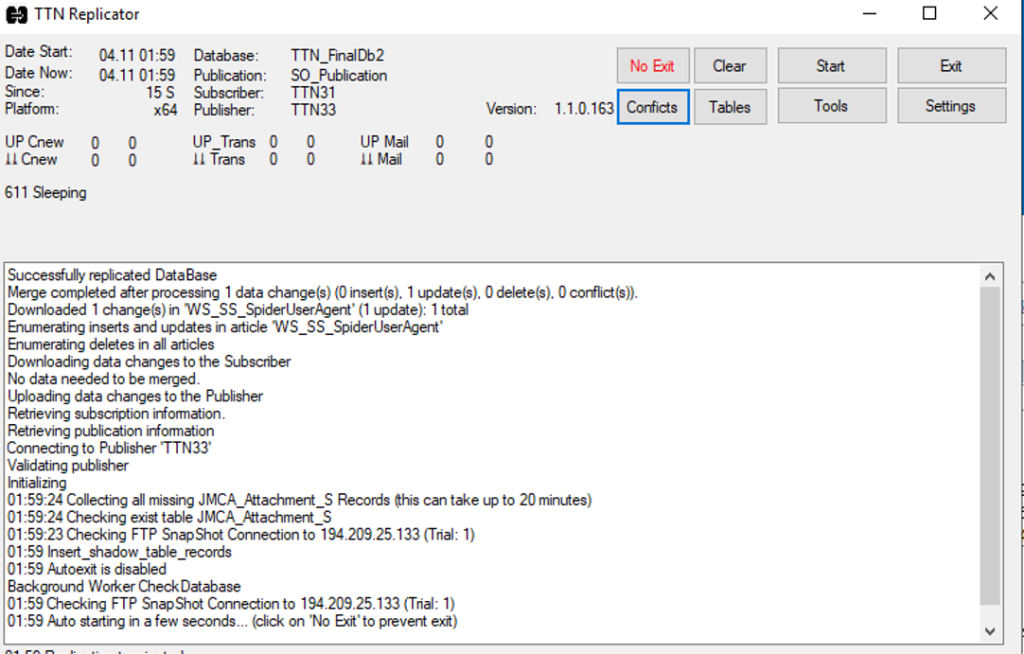
Figure 1: Replication runs frequently and pulls all important data offline
Translation files and client assets (for example, Word or HTML files containing JavaScript) may carry dangerous viruses. Even with virus scanners, complete protection cannot be guaranteed against AI‑enabled trojans designed to destroy or encrypt data. To mitigate this risk, all hardware components are mirrored and data is backed up regularly. The database and all project files are replicated several times per day, and backup drives are taken offline so that not all storage media are physically connected at the same time. This architecture makes total data loss practically impossible.
How is 24/7 server uptime guaranteed?
The entire system is mirrored, and all data is replicated several times a day. In the event of a complete system failure, operation is switched over to a replication server.
Each application involved runs as a TCP/IP service. The components monitor one another through periodic TCP/IP requests. If a component becomes unresponsive or crashes, the monitoring system detects the problem within minutes and automatically sends an SMS to the system operator on duty. This combination of replication, automatic failover and active monitoring ensures high availability and reliable 24/7 operation.
In which languages is TTN TMS available?
The user interface is available in 62 languages. Currently, only four of these languages are translated by human linguists; all others are machine-translated.
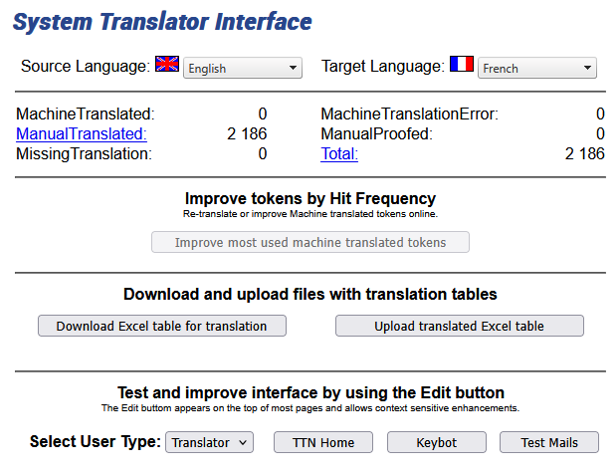
Figure 2: System translator interface
TTN TMS includes a system translator interface that allows both the client and translator interfaces to be translated into any language. Translators can edit and overwrite the forms in real time and simulate functions to view the text in context. The entire interface text can be downloaded and uploaded as a bilingual Excel file.
The Translation Manager interface is available only in English.
Can TTN TSM be used without any third-party software?
Translators have four options for translating files: the GroupShare online editor, Trados Studio using project packages, Trados Studio connected directly to the GroupShare server, or bilingual review files. Trados Studio is paid software; the Freelance perpetual licence typically costs about €700–€770. Most freelance translators have their own version of Trados Studio and connect directly to the GroupShare server.
A translator may also use the GroupShare online editor, which costs around €1,100, but this is included as part of the TTN TSM system. It requires no software installation on the translator’s or proofreader’s computer. The online editor is easier to use, but it offers fewer features than Trados Studio.
How can the system be operated cost-effectively for large organizations?
Large organisations such as NGOs with dozens or even hundreds of translators and linguistic specialists can purchase a limited number of concurrent online licences for the GroupShare server.
Based on established best practices, a user base of approximately 100 linguists typically requires only around 30 concurrent licences to cover about 98 percent of normal usage, while still allowing for occasional peak demand. As a result, using the online editor with concurrent licences is significantly more cost-effective than purchasing an individual licence for each user.
All of these features are fully supported by TTN TSM’s translation memory component, ensuring that previous translations are leveraged efficiently while giving translators full control and visibility. This TM matching mechanism not only increases productivity by reusing existing translations but also provides translators with clear information and options to maintain translation quality and consistency.
How does TTN TMS handle document analysis?
TTN TMS automatically incorporates the XML analysis files generated by Trados when a project is created. The system interprets this XML and displays an easy-to-read HTML report in the user’s browser. This way, all stakeholders can clearly view the analysis results without needing any external tools.
The analysis report is organized by segment and match type, providing a comprehensive overview of translation leverage. Segments are categorized as full matches, fuzzy matches, repetitions, or new (unmatched) segments. For each category, the report provides key metrics, including:
- Segment and Match Counts: The number of segments in each match category (for example, the count of 100% matches, high fuzzy matches, etc.).
- Character/Word Totals: The total number of characters or words in those segments. This can be configured per project – for instance, some projects track word counts while others use character counts (common for languages like Chinese or Japanese).
- Leverage Savings: How much content is “saved” thanks to matches and repetitions. In other words, this shows the volume of text that does not need new translation due to existing translations. These savings are displayed as both a raw count of characters/words and as a percentage of the total project volume. For example, a high fuzzy match (95–99% similarity) might count roughly 65% of its words as already translated (saved), meaning only about 35% requires new translation. By contrast, very low similarity matches may be treated as no savings since they likely need full re-translation.
- Weighted Estimates and Pricing: TTN TMS applies industry-standard weightings for each match type to calculate the effective work volume. Exact matches and repetitions are weighted at a lower percentage of their raw word count (reflecting less effort), whereas new segments are weighted at 100%. This produces a weighted word/character total that reflects the true translation effort after accounting for translation memory leverage. The system then multiplies these weighted counts by predefined rate factors for each category, automatically converting the analysis results into monetary terms. In effect, TTN TMS can instantly compute translator compensation or overall project cost based on the analysis data.
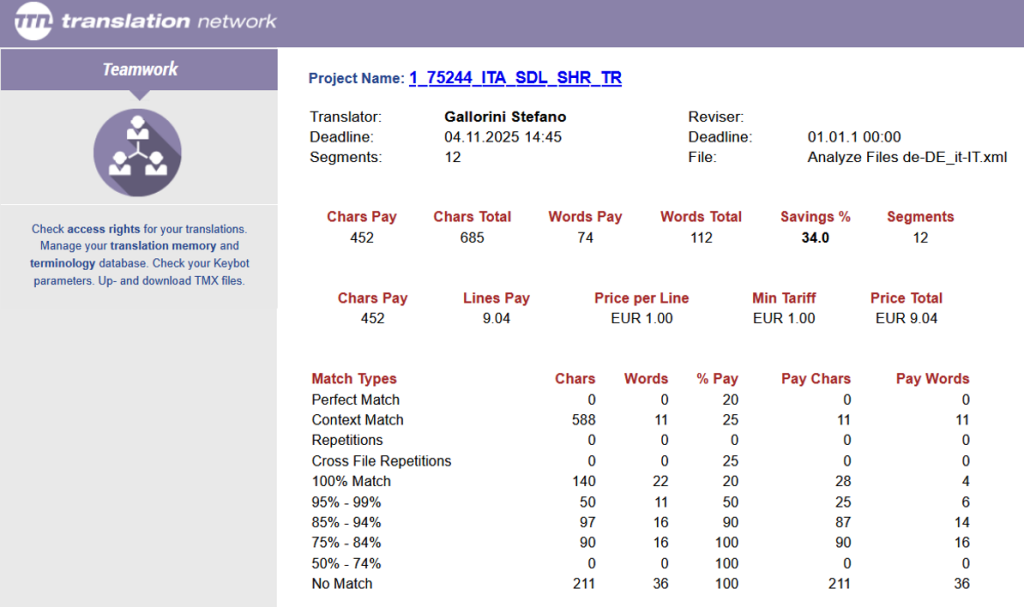
Figure 3: Document analysis in the web browser
These analysis statistics are not just for show – they are actively used for financial and management purposes. TTN TMS uses the detailed breakdown to automatically calculate translator compensation according to the organization’s rate scheme. Each match type corresponds to a specific pay rate (for example, translators might be paid a percentage of the full rate for fuzzy matches to reflect the partial work required). The system applies these rates to the analysis counts to determine how much each translator should be paid for the project. These calculations then feed into credit note generation and other bookkeeping processes, streamlining the project’s financial and administrative follow-up.