
Introduction
Confidential translation projects require strict handling to ensure sensitive information is never exposed. Unlike standard workflows where files might be downloaded or emailed, highly confidential documents are processed entirely within a secure online environment. TTN TMS provides a dedicated platform that allows translators to work on such projects without ever obtaining the source files on their local machines. All content remains on secure servers located in Switzerland, with no reliance on U.S. cloud infrastructure. This on-premises approach means documents never leave TTN’s controlled environment, addressing data residency and privacy requirements. Connections to the system are protected with strong encryption (TLS 1.2 or higher for data in motion), and files are stored encrypted at rest. In practice, from upload to delivery, the document stays within TTN’s protected network – it is uploaded to the secure server, translated through a restricted session, and returned to the client through the same encrypted platform. No unencrypted email attachments or local copies are used at any point, ensuring end-to-end confidentiality.
This chapter explains how TTN TMS handles confidential non-PDF translation projects via secure online workflows. (Secure handling of PDF files, such as scanned medical records or other top-secret PDFs, is covered separately – see link below.) The focus here is on standard digital documents (e.g. Word, Excel, InDesign, PowerPoint, etc.) that can be translated without file download. We outline the secure workspaces provided to translators, the robust authentication and access controls in place, the legal and procedural safeguards like NDA enforcement, and any special-case exceptions. These measures collectively ensure that translators can work efficiently on sensitive content while clients remain confident that their information is safe. (For anonymisation of personal data in translations, refer to section and Secure session logging and monitoring refer to the links below.)
Related links:
Secure handling of PDF files, such as scanned medical records
Secure session logging and monitoring
Anonymisation of personal data in translations
Secure Access and Online Workspaces
For confidential projects, TTN TMS enables translators to work within a closed online workspace rather than on local files. Two main approaches are available, both designed to prevent any data from leaving the secure server: an integrated web-based editor and a remote virtual machine environment. In either case, the translator accesses the material through a secure session, and the master documents remain on TTN’s servers at all times.
- Remote Virtual Machine (VM) Option: For certain cases – such as very large projects or translators who handle highly sensitive material regularly – TTN can provide an isolated Virtual Machine workspace. In this mode, the translator connects via Remote Desktop (RDP) to a secure VM hosted on TTN’s server farm. The VM is essentially a fully featured Windows desktop environment that comes pre-configured with all necessary translation tools (for example, a word processor or specific CAT software) and is locked down for that translator’s use. When working in the VM, the translator is viewing and editing the document on the remote server; only the screen images and keystrokes travel over the network.
Just like the web editor, the VM approach prevents data extraction. The remote desktop session is configured so that the clipboard is blocked or redirected – the translator cannot copy text from inside the VM and paste it to their own computer. File transfer channels are also closed: one cannot drag-and-drop files out of the remote desktop window or mount any local drives. Even within the VM, the system restricts saving files to only approved secure folders. In practice, this means a translator can work on the document (for instance, in a desktop application within the VM) but cannot export or print it outside the virtual environment. The VM itself resides on TTN’s network with a fixed internal address and is monitored and maintained by TTN’s IT team. This option offers an extra layer of isolation, which some clients mandate for top-secret projects or when using specific editing software. Importantly, both the web editor and the VM use encrypted connections (e.g. RDP over TLS) to protect data in transit.
In both scenarios above, the confidential documents remain on the server, and only authorized users can access them through the secure interface. All document content is stored in TTN’s secure on-premises data center in Switzerland. TTN does not utilise any third-party cloud storage for these projects – the files never leave TTN’s infrastructure.
Throughout the editing process, the system ensures that only the assigned linguists and necessary staff can open the files, and only for the duration required. Even within TTN, access to the files is role-based: a project manager or proofreader might access them via the same secure platform, but no one outside the project (and no unauthorized TTN personnel) can view the content. The platform’s safeguards also include continuous monitoring of user actions during these secure sessions. Unusual activities or attempts to bypass restrictions can be detected and logged. (For example, if a user tried to rapidly copy large amounts of text or use an unapproved method to capture data, it would be recorded by the system’s logs.) These layers of control guarantee that the sensitive information remains contained within the system at all times.
Authentication and Document Access Rights
Strong authentication and fine-grained access control are fundamental to TTN TMS’s secure handling of confidential projects. Before a translator can even reach the secure workspace described above, they must pass through a rigorous login and verification process. The system supports multiple authentication factors, which can be configured to meet the security policies of different client groups. At a minimum, each user must log in with a unique username and a strong password. On top of that, two-factor authentication (2FA) is enforced for sensitive projects: the platform can deliver a one-time verification code via SMS, WhatsApp, or email, depending on the preference or policy in place. For example, a translator in one client group may receive an SMS code to enter after their password, while another group might use an emailed confirmation link or a code sent through WhatsApp. The flexibility to choose the second-factor channel allows organizations to align with their internal security standards and the availability of devices.
Additionally, the login process can include a CAPTCHA challenge to ensure that the user is a real person and to thwart automated attacks. These measures (password, second factor, CAPTCHA) can be adjusted per client or user group – for instance, a government client may require multi-factor login for all its translators, whereas an internal corporate team might allow a simpler login if operating on a secured network. In all cases, the authentication process ensures that only vetted, intended users gain entry to the translation platform.
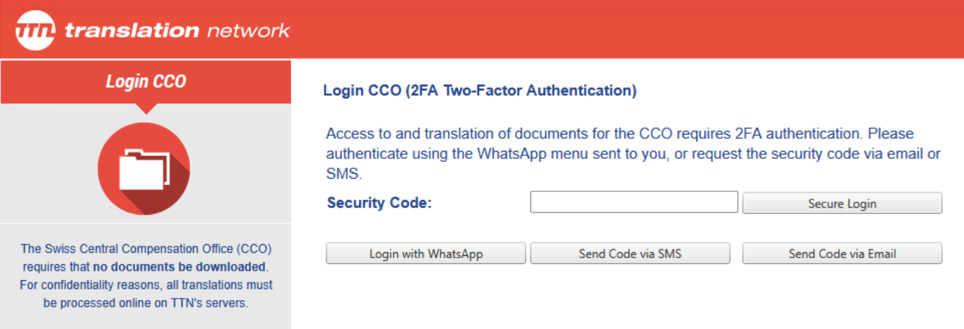
Figure 1: Client-specific authentication and access controls
Once authenticated, users see only the projects and documents they are authorized to access. TTN TMS uses tailored access rules to make sure that confidential files are available exclusively to the assigned translators and relevant staff. Projects are organized under client-specific profiles and secure groups, so that content for one department or client cannot be accessed by users outside that circle. A translator will only have visibility of the jobs to which they have been assigned (and often only for the time window of the assignment). If they are not part of a particular confidential project, it will not appear in their project list at all. This principle of least privilege is enforced system-wide: even within a project, different roles (translator, proofreader, project manager, etc.) have appropriate permission levels, and actions like exporting files are disabled for translators on high-security jobs.
Administrators can fine-tune these access settings on a per-client or per-project basis. The system’s flexibility in defining user-level restrictions means each organization can achieve its desired balance between security and convenience. All access attempts and actions are tracked in detailed audit logs, providing a full history of who accessed what and when. This audit trail not only helps in compliance and oversight, but also acts as a deterrent: users are aware that any unauthorized attempt to access or extract data will be noticed and traced.
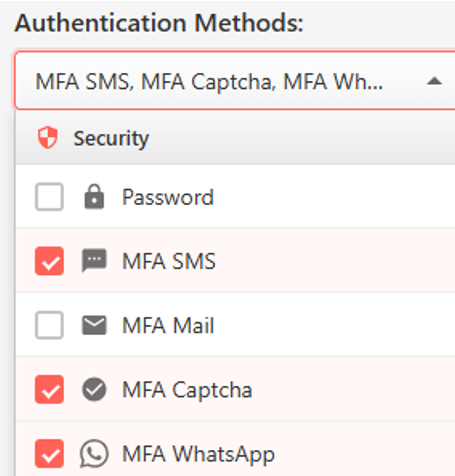
Figure 2: Secure login method selection (multi-factor authentication options)
Legal Framework and NDA Enforcement
In addition to technical controls, TTN TMS reinforces confidentiality through legal safeguards. A key element is the automatic Non-Disclosure Agreement (NDA) workflow integrated into the platform. When a project is flagged as highly confidential, the system requires each translator – or any user attempting to access the files – to sign a specific NDA before proceeding.
The NDA text is generated automatically based on the project’s classification. For example, it may include the project name, the client’s name, the date, and a reminder of the legal penalties for unauthorized disclosure. This process ensures that even if a translator already has a general NDA on file with the company, they are explicitly reconfirming their confidentiality obligations for each top-secret project. The system records the NDA acceptance – including a timestamp and the user’s identity – thereby creating a verifiable audit trail demonstrating that the individual agreed to the confidentiality terms before any work begins.

Figure 3: Automatic NDA management – access granted only when status is green
This NDA enforcement mechanism operates hand-in-hand with the system’s access controls. If a user declines the NDA or fails to sign it, they are denied access to the project. Only after agreeing to the non-disclosure terms does the platform allow the secure web editor or VM session to launch for that project. In effect, the NDA is a gateway that must be passed for every highly sensitive job, adding a layer of legal protection on top of the technical security. Clients can thus be assured that every translator working on their confidential content has explicitly accepted a binding confidentiality commitment at that moment, not just as a clause in a long-past contract. From a compliance perspective, this satisfies many organizations’ requirements for handling secret or regulated information – it demonstrates due diligence in ensuring all personnel are aware of their obligations.
Moreover, because the NDA process is automated and mandatory, there are no accidental oversights: the platform will not “forget” to secure an NDA for a confidential project, nor can a user claim they weren’t prompted. Everything is systematically applied. In conjunction with this, TTN’s overall legal framework for the platform aligns with strict data protection laws (such as Swiss regulations and the EU’s GDPR). Data processing agreements and confidentiality clauses are built into the service, but the per-project NDA prompt adds an extra layer specific to each job’s content. By combining robust technology with legal acknowledgments, TTN TMS creates a comprehensive confidentiality shield – both preventing leaks and underscoring the seriousness of handling sensitive data.
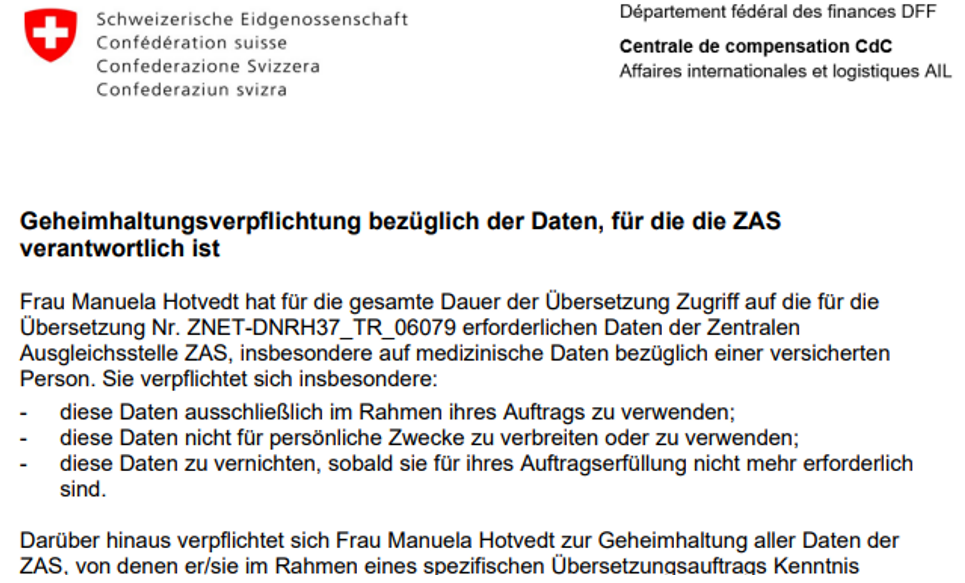
Figure 4: Automatically generated NDA with client- and order-specific data
Connection Models for Secure Workflows
TTN TMS supports multiple connection models for handling projects, each balancing security and practicality in different ways. Figures 71–73 illustrate three progressively secure workflows – from an emergency mode that relaxes protections for speed, to a standard encrypted file exchange, up to a fully locked-down online workspace. The following subsections explain each model in detail, highlighting differences in security level, file transmission methods, user authentication, and access control.
Delivery-Prioritized Emergency Workflow (Low Security)
In urgent, low-sensitivity scenarios, the priority is rapid delivery even if some security measures are temporarily relaxed. For example, a natural hazard warning or emergency announcement might be translated via an expedited path outside the usual platform. In this delivery-prioritized mode, the system activates predefined fallback channels if standard infrastructure is unavailable or too slow. The source text may be sent to an on-call translator through an automated email alert or a secure FTP link, rather than requiring the translator to log into the full TMS workspace. Likewise, the completed translation might be returned through an encrypted email attachment or direct upload to a client system. These steps bypass the normal online editor to save precious minutes when content must be disseminated immediately. The trade-off is a relaxed security posture: files leave the protected server environment so that the translator can work offline, reflecting an accepted risk only because the content is not highly confidential and time is of the essence.
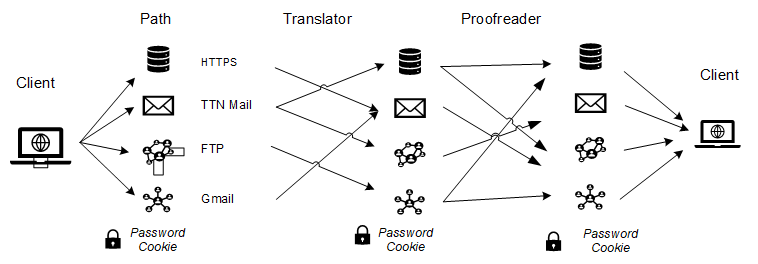
Figure 5: Natural hazard warnings — delivery prioritized, security neglected
Standard Encrypted Workflow (Moderate Security)
The standard workflow represents the typical secure file exchange used for most projects. In this model, translators and reviewers access the project files through normal secured channels (for instance, via the TTN TMS web portal or integration with Trados Studio) using their credentials. They download the documents to their own computer and work locally with their familiar tools. All transfers occur over encrypted connections – for example, an HTTPS web download, a secure API call from Trados, or even an encrypted email if the platform sends a translation package by mail. Throughout this process, files are protected in transit by TLS encryption and are only accessible to the authorized user. The translator must log in with at least a username and password (and, depending on client settings, possibly a second authentication factor) to retrieve the assignment. This ensures secure access to the files while still allowing the convenience of local editing.
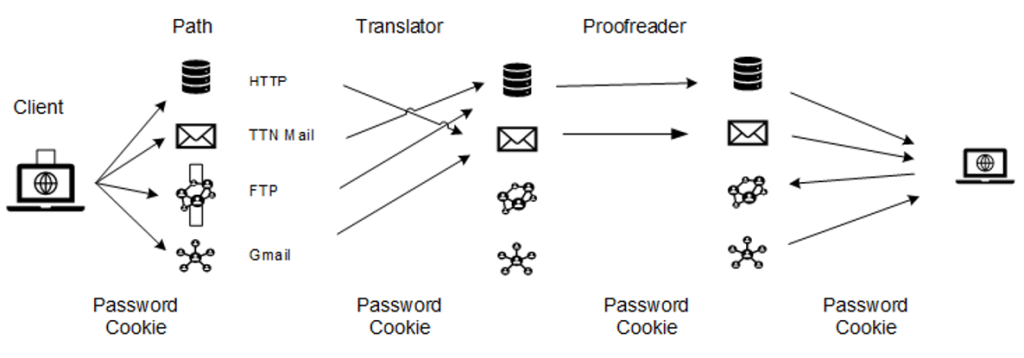
Figure 6: Normal workflow: secure access and encrypted transmission
Once downloaded in the standard model, the file exists on the user’s machine, so this approach carries moderate security relative to a fully closed system. The user is required to comply with TTN’s information security policies, which are aligned with ISO, and is responsible for handling all locally processed content in accordance with defined confidentiality, access-control, and data-protection requirements, acknowledging that certain actions on local systems cannot be fully enforced by technical controls alone. However, TTN TMS enforces access control up to the point of download: only the designated linguist or staff member can retrieve the document, and only within the time window of their assignment. Project visibility is limited by client-specific profiles and user roles, so a translator will only see jobs they are assigned, and no one outside the project can intercept the files from the server. In summary, the standard encrypted model keeps transmission secure and restricts access to approved personnel, but it entrusts the individual translator with responsibly handling the document on their local system.
Fully Secure Online Workflow (High Security)
The fully secure workflow provides the highest level of protection by confining all translation activities within TTN’s controlled environment. In this model, no external copies of the document are ever downloaded – work is done either in a web-based editor or on a remote virtual machine, both hosted on TTN’s secure on-premises servers. Users must undergo strong authentication (including multi-factor login) to even reach the workspace. Once inside, the system strictly governs what they can do with the content. The document never leaves the secure server: the linguist only interacts with it through an encrypted viewer or remote desktop session. All usual file operations that could leak data are disabled. For example, there is no “Save As” function to export the file, printing is completely prohibited, and copy-paste is heavily restricted. Similarly, in a VM scenario, features like clipboard transfer or drive sharing to the local computer are turned off. These measures ensure that even if a translator attempted to bypass rules, the platform’s safeguards would prevent any large-scale data exfiltration.
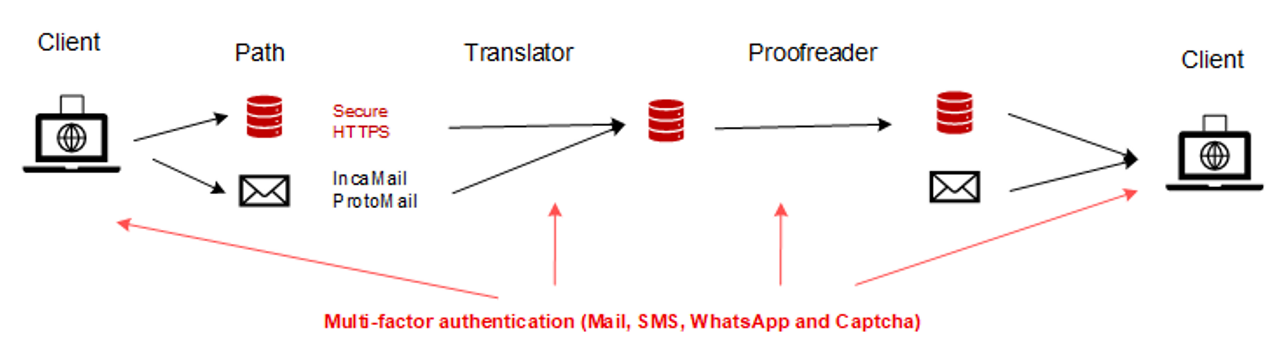
Figure 73: Secure workflow: 2FA authentication, documents remain in secured environment
In the fully secure model, access control is granular and monitored continuously. Only authorised individuals can open the project, and even then they can only do so within the secure interface – no one can access the document contents externally. The platform logs all user actions and can detect unusual activity, providing an audit trail for compliance. Additional protections can include real-time session monitoring and automatic anonymisation of sensitive data in translation memory entries, so that no personal or confidential details are exposed beyond the immediate task. This highest-security workflow is often mandated for top-secret material, legal documents, or any content under strict data protection regulations. It gives clients full confidence that their information remains sealed within a controlled environment. In exchange for this security, the workflow is more controlled and formal – users must authenticate with multi-factor methods, and they work through a slightly more managed process (web editor or VM) rather than a local application. Nevertheless, TTN TMS’s design makes this as seamless as possible, so translators can still work efficiently.