
 Deutsch
 Français
 English
TTN TMS records all server access details using built-in Windows Server and IIS logging. Every request to the system is logged with its timestamp, the originating IP address, and user identification. The logs also capture the specific resource or URL accessed including query parameters to provide context for each action. These comprehensive web server logs are retained for audit and security reviews, ensuring that any access to the system can be traced back to a specific user and location if needed. Unsuccessful access attempts (such as failed logins) are similarly logged for further investigation.
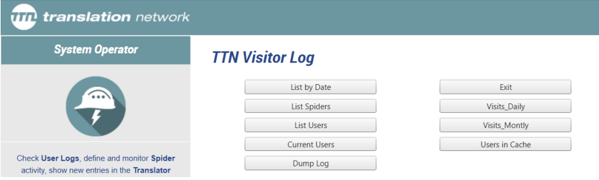
Figure 1: TTN logging system
What firewall and geo-restriction measures are in place?
TTN employs an advanced firewall system to protect the TMS. All incoming and outgoing network traffic passes through strict firewall rules, and the firewall logs connection attempts and traffic details for security monitoring. Geo-restriction measures are implemented to block or limit access from certain regions or jurisdictions as required. For example, the system can be configured to deny connections from specific countries or states known for high risk or not relevant to the business. Any connection attempt that is blocked by these geo-filters is recorded in the firewall logs. These measures reduce exposure to malicious traffic by analysing IP geolocation and only allowing access from permitted regions. All firewall and blocking events are logged and can be reviewed by administrators to identify any unusual patterns or repeated unauthorised access attempts.
How does TTN detect VPN or proxy connections?
The platform includes VPN and proxy detection measures to enhance security. TTN TMS uses IP intelligence databases such as IP2Location to determine if a user’s IP address is coming from a known VPN service, proxy, Tor exit node, or other anonymised source. If a connection is identified as a potential VPN/proxy, the system can flag it or block it according to security policy. This prevents users from bypassing geo-restrictions or hiding their true location. All such events are logged with details of the detected proxy/VPN. These logs enable the team to review and ensure that only legitimate, traceable user connections are interacting with the system.
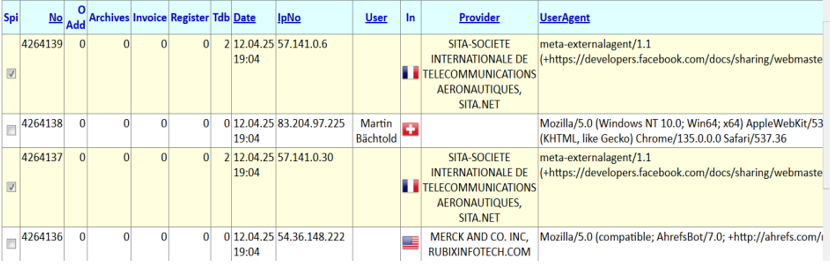
Figure 2: TTN’s dedicated logging system allows monitoring of access to the website
Are the email and DNS servers monitored for security?
Yes. TTN’s email and DNS infrastructure are closely monitored with automated logging and alerts. The email servers automatically log all sent and received messages, including metadata like sender/recipient, time, and IP. Unusual email events – for example, a high volume of outgoing messages or repeated failed delivery attempts – will trigger alerts to the IT team. This helps in detecting spam, spoofing, or any email system misuse early. Similarly, the DNS servers are configured to log queries and any changes to DNS records. Any unexpected or unauthorised change in DNS (such as an attempt to redirect a domain) generates an immediate alert. These controls ensure the integrity of TTN’s communication channels: if any irregular activity occurs in the mail or DNS systems, administrators are notified in real time so they can take prompt action.
What internal logging and traceability features does TTN TMS provide?
TTN TMS maintains detailed internal logs for all significant user and system activities, which provides full traceability across the platform. Every user action – such as logging in, downloading a translation file, updating a project, or changing a setting – is recorded with a timestamp and the user’s identity. The system creates an audit trail for each project and transaction, so that every step can be followed and reviewed. This includes logging of actions by automated subsystems as well. For example, internal “robot” processes (such as the mail-processing robot or automated workflow agents) have their own logs of the tasks they perform. All these logs are centralised or linked via unique identifiers (e.g. order IDs or transaction IDs), allowing cross-referencing of events across different modules. This comprehensive logging approach means administrators can trace a sequence of events from start to finish, even if it spans multiple subsystems. It greatly enhances accountability and helps in troubleshooting, since there is a clear record of each operation and who or what initiated it.
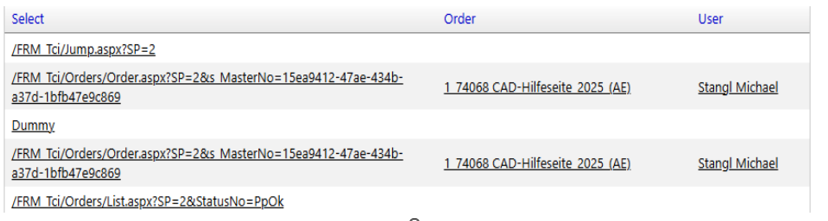
Figure 3: URL with arguments, order number and order name, and user
Can administrators monitor the system in real time?
Administrators have access to real-time monitoring tools for TTN TMS, and they can supervise the system remotely, including from mobile devices. The platform provides live dashboards and status views showing key metrics and security events. In addition, TTN TMS has a proactive alerting system: if certain conditions or anomalies occur (such as a server error, a security alert, or a missed deadline), the system will automatically send notifications. These alerts can be delivered via email or even SMS/secure messaging apps, allowing on-call administrators to be notified immediately. The web-based admin interface is mobile-friendly, so authorised staff can securely log in from a tablet or smartphone to check system status, review logs, and respond to issues in real time. This capability ensures that critical events are not missed and that the support team can react swiftly from anywhere.
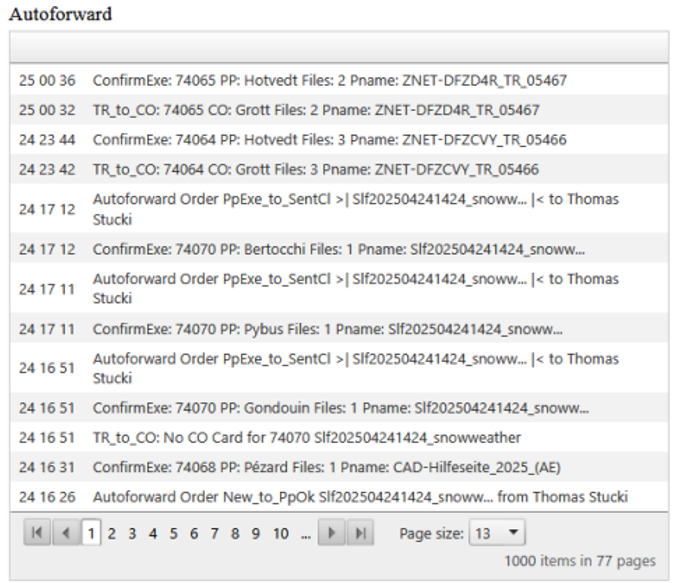
Figure 4: Monitoring of auto-forward activity
How are password reset attempts handled and logged?
TTN TMS treats password reset attempts with a high level of scrutiny to prevent unauthorised access. Every request to reset a password is logged with details such as the user account in question, the time of the request, and the source IP address. The system will only initiate a password reset process after verifying the request (typically by sending a secure reset link to the user’s registered email address). If there are multiple or rapid-fire reset requests for the same account, or any pattern that appears unusual, the system flags it for manual review by an administrator. In such cases, TTN staff will manually verify the user’s identity (for example, contacting the user through a known communication channel) before allowing the password reset to proceed. This manual verification step, combined with thorough log records, ensures that password resets are legitimate. By having these logs and checks in place, TTN TMS prevents malicious actors from using the password reset function to gain unauthorised access, thereby maintaining account security.

Figure 5: Monitoring of password reset requests