
Overview
Workflow automation in this system is handled by a dedicated application called Work Loop. This standalone application is designed to perform and coordinate most routine tasks automatically, with minimal human intervention. By configuring Work Loop appropriately, the organisation can offload a large portion of daily workflow tasks to run fully automatically, ensuring efficiency and consistency.
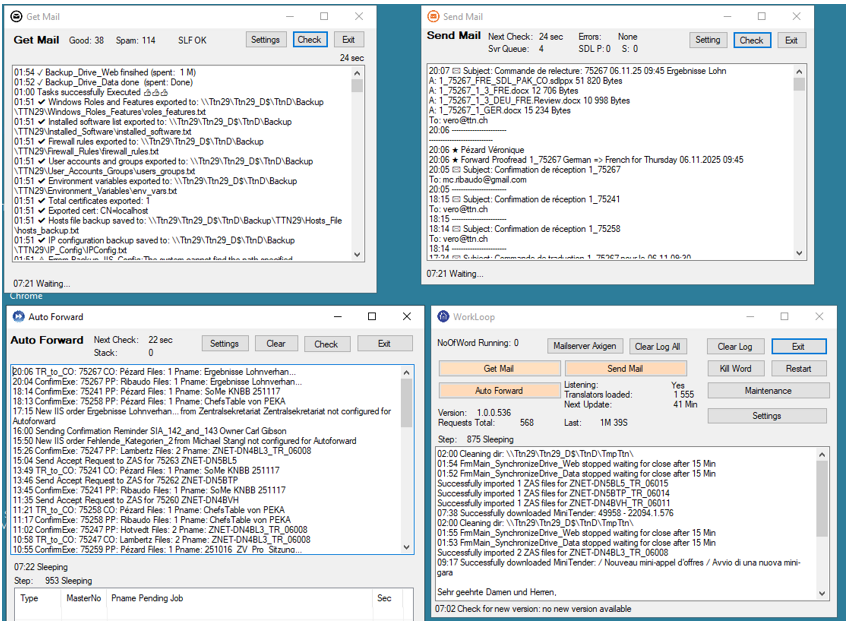
Figure 1: TTN Work Loop handles predefined task automatically
Get Mail Service
The Get Mail Service is an AI-powered mail robot that continuously checks for new incoming messages (approximately every 30 seconds). Whenever a new email arrives, the service automatically assigns it to the corresponding translation order or the responsible Translation Manager. This service interfaces with various channels – it checks email servers, monitors FTP directories, accesses IncaMail, and other mail services – to download files or messages from all kinds of sources. Most incoming mails contain a unique fingerprint (such as a translation number or similar identifier), which the Get Mail Service uses to recognize the related order. Upon identification, the mail is attached to the appropriate order and made visible to the Translation Manager in charge. The Translation Manager also receives a summary of the mail on their mobile phone, allowing them to keep track of every new piece of information in real time without needing to constantly check their inbox.
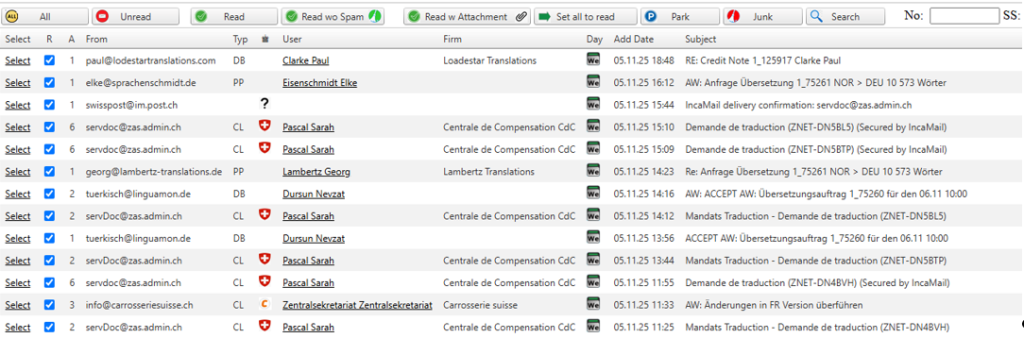
Figure 2: The AI mail robot classifies emails and assigns them to orders and accounts
Auto‑forward Service
The Auto-Forward Service automatically prepares orders to be sent out to the next parties in the workflow (translators, proofreaders, or clients) as soon as the orders are ready for them. It handles the logistics of forwarding files and information, ensuring that each contributor in the process receives what they need without delay. This service also queues up warning notifications for Translation Managers if something requires attention – for example, if an order is running late or if an expected file has not arrived. By supervising late or incomplete orders in this way, the Auto-Forward Service helps keep projects on schedule and makes sure no task falls through the cracks.
Send Mail Service
The Send Mail Service manages the distribution of completed translation files and automated notifications. It can send finalized files to clients via email and also dispatch messages or alerts through other channels like WhatsApp or SMS to keep everyone informed. In addition, this service transfers files to designated FTP or SSH servers when required (for instance, delivering translations to a client’s FTP site) and uploads documents to secure platforms such as IncaMail. By handling multiple delivery channels, the Send Mail Service ensures that files reach their destination in whatever format or method the client or translator prefers, all without manual intervention.
Workflow Optimization and Benefits
Work Loop is not just a simple background service running continuously – it is a robust standalone application that actively oversees and optimizes the entire translation workflow. Because it operates independently of the main IIS-based web application, it can run continuously and reliably without impacting the user-facing system. Work Loop recognizes new orders and incoming translated files from translators as soon as they appear (whether via email, FTP upload, or other channels) and automatically integrates those files into the database and the appropriate project records. It also supervises all other applications and services in the workflow, effectively acting as a central orchestrator that makes sure each component is doing its job correctly and on time.
This application significantly improves error detection and response in the workflow. If any part of the process fails or encounters an error – for example, if a file download from an FTP server fails, or a deadline is missed – Work Loop will detect the issue immediately. It then sends instant SMS alerts to the Translation Managers, so they are notified right away about the problem and can take action if needed. Work Loop also handles special requests that might require interaction with web interfaces by using Selenium-driven browser automation to download or upload files from web portals when necessary. Additionally, it continuously monitors deadlines for all active orders, sending reminders or escalating issues if a deadline is approaching and a task isn’t completed.
By automatically forwarding orders and files to the right people at the right time – including sending completed translations to proofreaders for review and then delivering the final documents to clients – Work Loop ensures a smooth handoff between each stage of the translation process. The result of implementing Work Loop is a highly optimized workflow: routine tasks are handled faster and more reliably, human error is greatly reduced, and Translation Managers can focus on critical decisions rather than manual tracking. Overall, this standalone application has proven to streamline operations, improve turnaround times, and provide real-time oversight of the entire translation project pipeline, greatly benefiting both the translation team and their clients.